MulmoTerminal — a browser terminal for parallel Claude Code and Codex agents — organized by the four pillars (Supervise / See / Automate & investigate / Extend). For how to use them, see Basics and Scenarios.
| Feature | Description |
|---|---|
| Parallel terminals | Up to 9 cells per page; overflow adds a new page (tab). Cells auto-sort by state (needs-you first) |
| Status colors + sound | Working (blue) / awaiting input (amber) / done, review it (green ring) / idle. Know you’ve been “called” without watching |
| Cockpit roster | While zoomed with Expand, a one-row-per-session text list beside the terminal (directory, AI summary, prompt, latest reply, status word). Click a row to swap; Show list roster / Show thumbnail strip toggles the thumbnail filmstrip |
| Keyboard: switch the enlarged terminal | While zoomed, bound keys walk the enlargement along the on-screen order. Opt-in — nothing is bound by default; add a keymap to config.json (config) |
| Rate-limit gauge | The 5h / 7d windows your Claude (and Codex) subscription shares across every session, always visible in the grid header. Running many agents is what burns them fastest, and nothing else in the app showed them. Shown only once an agent reports; hover for when each window resets. Whenever more than one thing is on the row, each set of figures carries its tool’s mark, so claude usage n/a beside a 7d figure cannot be mistaken for Claude’s own. When it cannot be shown, it says why — no claude on PATH, an account with no windows (API-key billing), a check waiting on Claude Code’s trust prompt (run claude in that folder once and accept it), or one that got no answer and is retrying. A reading it can no longer vouch for is dropped rather than drawn as current |
| Machine load | The load average of the machine your sessions run on, beside those windows, as a percentage of its cores — load 334% is a 20-core machine with 66.8 runnable processes. 100% means every core has work queued and starting another agent slows the ones already running (amber); 200% means everything is waiting for a core (red). Hover for the raw 1 / 5 / 15-minute figures, the core count and the multiplier (3.3x). Refreshed every 10 seconds. A host that keeps no load average — Windows — shows nothing rather than 0%. Switch it off in Settings under Grid header read-outs |
| Add / close / reorder cells | New terminal, each cell’s close button, and Move left / Move right in reorder mode. Ordering is auto (attention first), manual, or priority (what each project declared in orderPriority — config) |
| Set a terminal aside | The moon button in a cell’s header sinks it — the tile, its filmstrip thumbnail and its roster row all fade, and the working dot stops pulsing. It stays connected and keeps its whole history: this is the alternative to /clear-ing a cell you are done with for now, which resets the conversation to change how the cell looks. Survives a reload. Enlarging it keeps it faded, so you can read a set-aside session without waking it — the roster row keeps its blue “you are here” edge either way. Typing into it wakes it — clicking or scrolling to read it does not, even though a mouse-tracking agent receives those as input. Nothing has to be undone by hand. A cell that stops for a permission prompt comes back to full strength on its own; a merely finished turn does not, since that is what setting it aside leads to |
| Six kinds of notification sound | Besides finished and input-waiting: a Run cell succeeding or failing, a session exiting, and a PR going red. Only the first two are on by default; the rest are opt-in (config) |
| Worktree isolation | Git worktrees so many agents can run on the same repo without colliding (→ Worktrees) |
| Session persistence (tmux) | If tmux is available, each session runs inside tmux and reconnects across reloads and server restarts |
| Phone companion (RemoteHost) | Web Push to your phone on finished / input-waiting turns, plus watch, reply, and start a new terminal from the phone — with your own one-tap chips (→ From your phone) |
| Feature | Description |
|---|---|
| That agent’s current work | The header shows “what it’s doing right now” |
| Session note | Your own one line about what a cell is for — everything else in the header is what the agent said, which stops telling cells apart once several are open. The pencil beside the header text opens a box (Enter saves, Esc cancels); while a note is set it replaces the header line, and the title it displaced moves to the tooltip. The note is also the session’s name in the launcher’s session list and on the phone. Kept per session: close the cell, restart the server, resume that session and it comes back |
| Git status chip | ⎇ branch ●changes ↑ahead ↓behind, always shown |
| PR phase / work phase | Each roster row badges the branch’s PR state (draft / CI fail / changes / ready / merged …) and the work phase (planning / editing) |
| Model / context size | e.g. Opus · ctx 35% — the active model and how full the context is |
| Activity timeline | Tool-call history (Bash / Read / Edit …) shown newest-first in a modal |
| Prompts pane | The prompts you sent this session, newest first, in a pane beside the enlarged cell — the mirror of the timeline above (what the agent ran vs. what you asked for). Read-only, keeps up while left open, Claude and Codex |
| Copy the last code block | A cell-header button puts the last fenced block of the latest reply on the clipboard, taken from the agent’s own transcript rather than the screen — so no line wrapping or leading spaces come with it and it pastes cleanly into Discord / Slack / email. Where the browser blocks clipboard access (any address that is not https or localhost, i.e. from your phone) it shows the block selected for copying by hand instead |
| Cost (estimated) | Approximate session / today / this month cost in settings |
| Worktree diff badge | Shows the amount of change on a worktree cell; click for the diff panel (→ the diff badge) |
| GUI panel | Renders diagrams, forms, images, and documents — plus HTML, video/slides (MulmoCast), collections, and accounting — from the agent’s tool calls (Claude / Codex both supported) |
| Clickable file paths | A file path an agent prints in the terminal becomes a link, and what it opens is chosen by extension: .md renders, .json is indented, .csv / .tsv become a table (each in a new tab), source and .txt open in the app’s own Files view for editing, and images / PDF / video open as-is. While a grid cell is enlarged the file pane beside it takes the click instead, so the file opens next to the terminal that printed it — everything but the images / PDF / video row, and only for files under that cell’s own directory. Files within the session’s working directory (routing table) |
| Cross-repo PRs / Issues view | All registered repos’ open PRs and issues — in the pane beside an enlarged cell, led by that cell’s repository, or in the toolbar’s full-screen Pull requests view |
| Wiki / Collections / Accounting / Files | In-app views from the toolbar: a Wiki (with a graph view), collections, accounting, and a file explorer + editor |
| Summary when it hands back | A Claude session ends its reply with what was asked, what it achieved, and what it left whenever it finishes or stops to ask. Coming back to a cell later, that is the current state without scrolling back |
| See why a setting isn’t working | Settings’ Directory settings shows what each directory’s .mulmoterminal.json actually puts in force, which file it came from, and the keys dropped or never read (config) |
| Update notice | When a new version ships, the header shows an update badge; click it for the update command that fits your install (npm / git clone) |
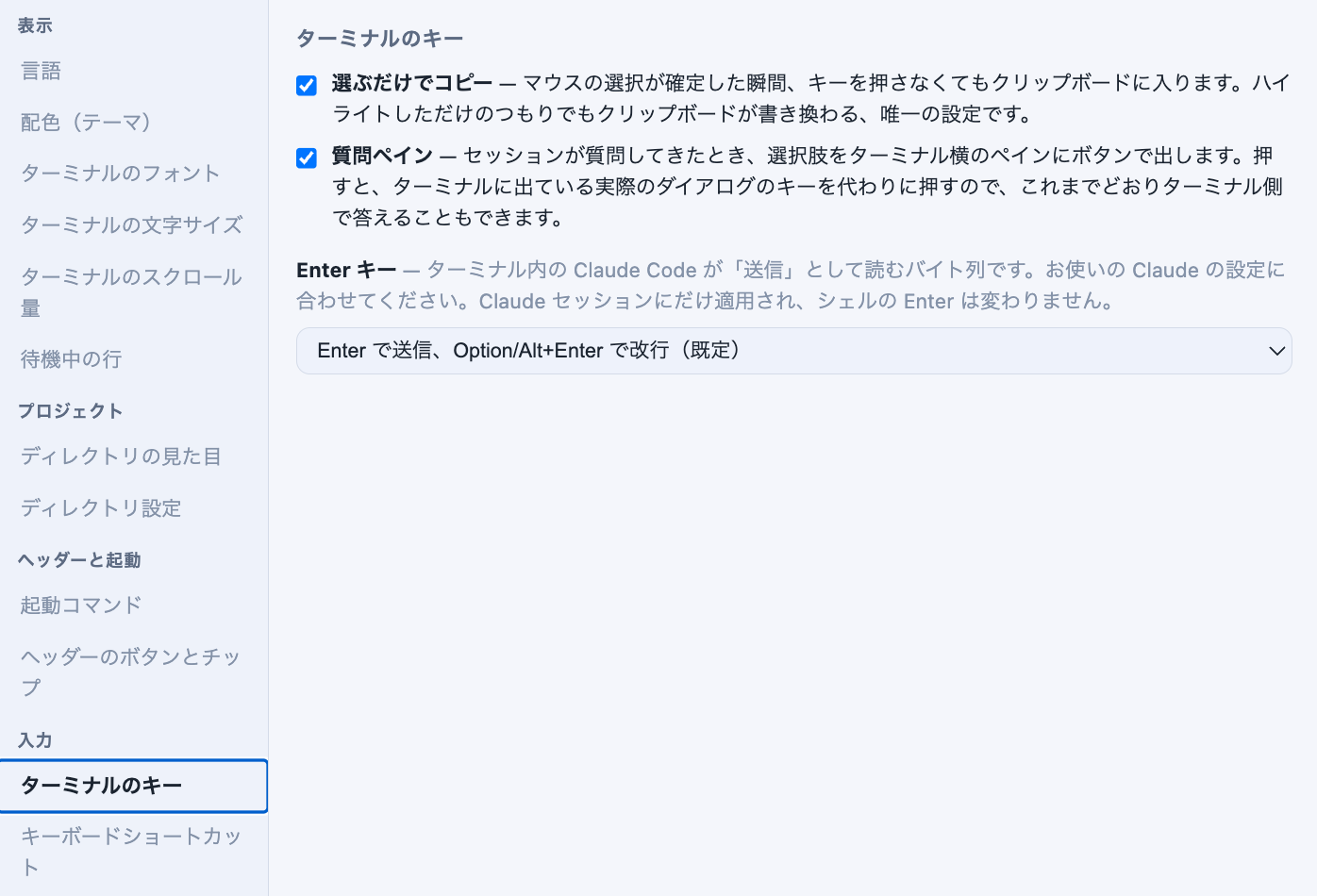
| Question pane (opt-in) | When a Claude session stops to ask you something, its choices appear as buttons in a pane beside the enlarged terminal → answering a question from the pane |
A Claude session that stops to ask something puts a dialog in the terminal that you answer with the arrow keys. Turn on Settings → Terminal keys → Question pane and the same choices also appear as buttons beside the enlarged terminal.
The pane opens by itself on the enlarged cell the moment the question arrives, and closes as soon as it is answered. A question that arrives while its cell is tiled opens when you enlarge that cell — there is no button for it, because there is nothing to open when nothing is being asked.
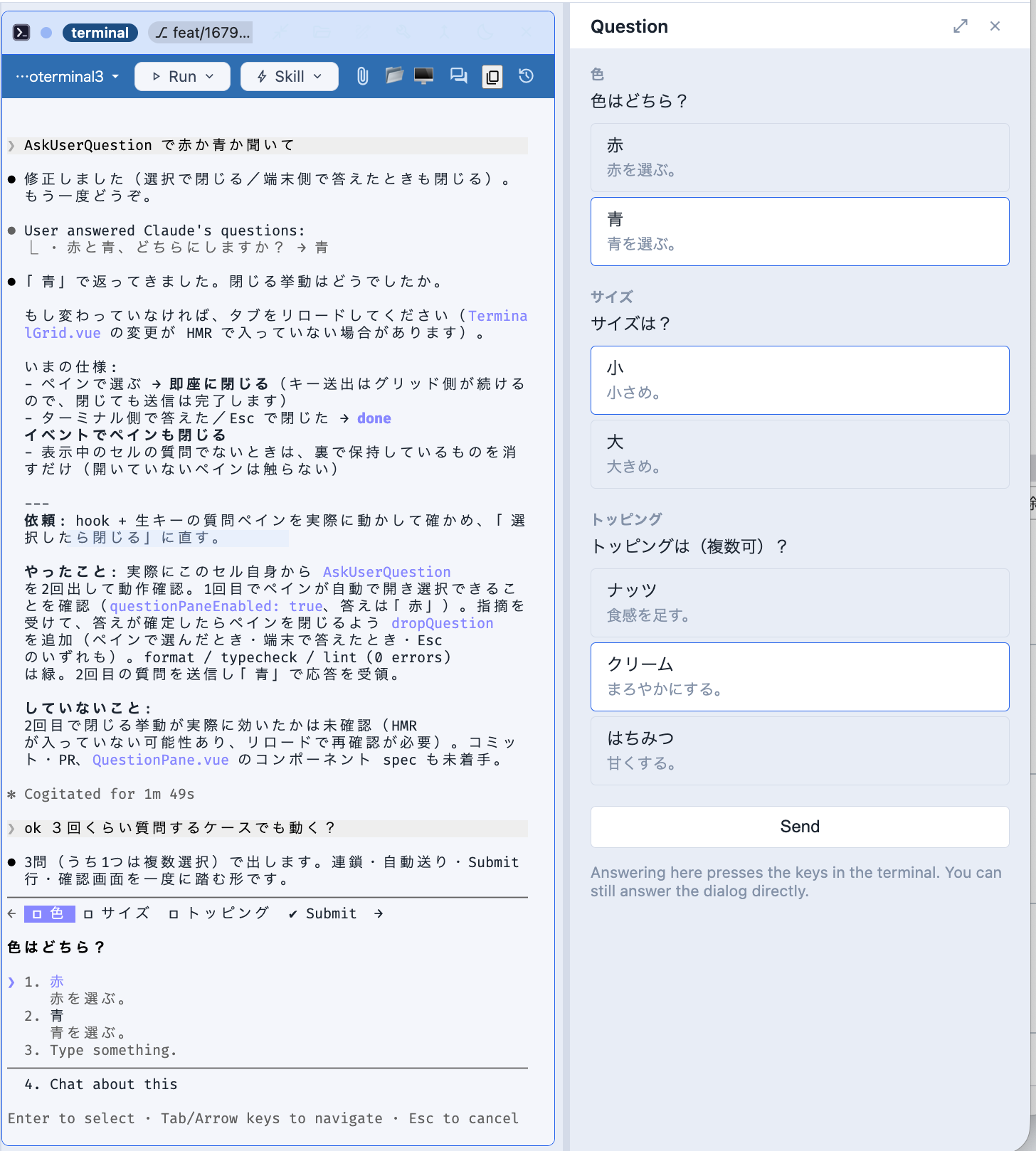
The dialog does not go away, and the pane does not replace it. Picking here presses the arrow keys and Enter in the real dialog on the left, so whichever end you answer at wins and someone who prefers the keyboard notices no difference. That is also why the pane can only offer what the dialog’s own list holds: Chat about this stays in the terminal.
Answering in your own words works when there is a single question and it takes one answer: a text box appears under the buttons, and what you write goes into the dialog’s own Type something row. It is not offered for several questions at once, or for a multi-select one — the keystrokes would stop somewhere that is not an answer.
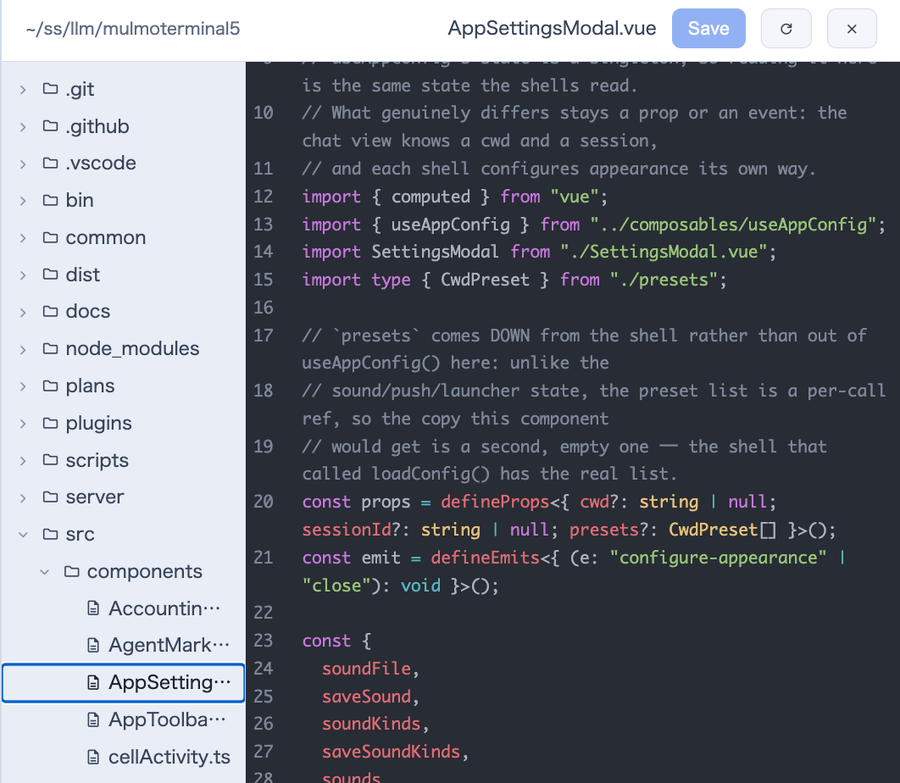
Enlarging a grid cell (Expand) puts a folder toggle in its header. It splits the enlarged area in two: terminal on the left, the file explorer + editor on the right, rooted at that cell’s directory and unable to reach above it. Drag the divider to resize, or focus it and use ←/→, Home, End. It works in both zoomed layouts, follows the enlargement as you move between terminals, and remembers whether it was open, how wide, which file you had open, and which folders you had expanded — so a page reload puts the file back. That restore is handed out once per directory, so a second terminal in the same repository still starts on its own empty tree.
The same editor still opens full-screen from a Files header button or by clicking a file path an agent printed.
The editor colours the language it is showing. Markdown, JS/TS and JSON are always ready;
HTML (including .vue, .svelte and .astro), CSS/SCSS, YAML, XML/SVG, Python, Rust, Go,
Java/Kotlin, C/C++/Objective-C, PHP and SQL are fetched the first time you open one — so such a
file may appear as plain text for a moment before the colours arrive. Anything else stays plain.
Editing is safe against the agent working in the same directory.
| What happens | Why |
|---|---|
| Leaving an open file saves it — switching files, moving the zoom, closing the pane, navigating away, closing the tab | The editor sits beside a terminal you are working in; a Discard unsaved changes? dialog would interrupt that flow every time the enlargement moved |
| A save is refused (409) if the file changed on disk since you opened it | An agent rewriting the file you have open is normal here. A banner then offers to reload the disk’s copy or to overwrite deliberately |
Opening a file, and replacing one, keep three generations under ~/.mulmoterminal/backups/ |
Not asking is only defensible if what a save replaced can be fetched back. Outside the project, so no .bak reaches git status or the agent |
| If neither the save nor the backup can be written, nothing moves on | With no copy anywhere, walking away is the one outcome that loses what you typed |
| A file that changes on disk is picked up without waiting for your save — instantly from Claude’s write hook, and within 30 seconds otherwise | A clean buffer just takes the new content, so the pane reads as a live view; a dirty one raises the banner instead of choosing for you. The poll is what covers Codex, git, builds and other editors |
Two gaps are worth knowing: closing the full-screen view outright cannot keep the buffer if the backup store is also failing, and on tab close the browser caps the request at 64 KB, so a very large unsaved buffer may not get out.
| Feature | Description |
|---|---|
| File attach | Drag & drop a file onto the terminal, or use Insert a file path to pick one in the OS dialog — the absolute path is inserted |
| Screenshot paste | Paste an image straight into the terminal: it is saved where a dropped file goes and its absolute path is inserted. Saves the trip through a file — a screenshot never has to be written somewhere and picked back up. PNG / JPEG / GIF / WebP; pasting text is unchanged |
| Script execution | Run a command from that directory’s script.json. From a running session’s Run menu it launches in a spare cell next door, so the conversation isn’t interrupted (an empty cell’s launcher runs it in place) |
| Skill menu (Run a skill in the current session) | Lists the skills available in that directory (.claude/skills); picking one runs its /<slug> in the current session. Working-dir skills show first; narrow the list with skills in .mulmoterminal.json |
| Mulmo menu (Show a deck from this directory) | Lists this project’s mulmoScript decks and shows the picked one in the Canvas beside the cell. A viewer: nothing is typed into the session and the agent is not asked, so it costs no tokens. Two named sources and no search — the workspace’s artifacts/stories, plus the paths you list in decks in .mulmoterminal.json. Works in the workspace and in the directories your launcher has saved (up to 64, read once at startup); any other deck is still reachable from the file tree’s Open in the Canvas |
| Git actions | One click from a worktree cell: commit (ask Claude) / push / Open PR |
| Copy & paste | copyOnSelect copies the moment you finish selecting (off by default), and copy / paste can be bound to keys (keymap). Both are opt-in, because a bound key stops reaching the program inside the terminal (config) |
| Summarize output (AI) | Pass terminal output to claude -p and summarize errors / warnings / cause / how to fix |
| Copy as prompt | Copy command + directory + summary + follow-up and paste it into any session |
| Cross-terminal talk | Bring another terminal’s last turn brings another cell’s last turn into this one; Exchange does an automatic round-trip — send, wait for the other agent’s answer, bring it back (great for Claude ↔ Codex mutual review) |
| Plain shell | The launcher’s Shell toggle runs your OS default shell ($SHELL) in the chosen directory as a persistent terminal — nothing to install, nothing to configure |
| Launch commands | Start any other interactive command (codex, htop, …) as a persistent terminal |
| Voice input | Dictate into the prompt via microphone transcription. Settings picks the language you dictate in (per browser) — your browser’s, per-clip detection, or a fixed one; speaking a language the mic isn’t expecting comes back translated into the one it is |
| MCP servers | Join your own HTTP MCP servers to sessions via the MCP SERVERS setting |
/mulmoterminal-bug-report |
Something looks broken? The bundled skill hears the symptom, checks whether it is actually configuration or by design (reading your real config and version), searches the existing issues, and only then helps you file one — with the environment collected and secrets masked |

| Feature | Description |
|---|---|
| Header action buttons | Add input (send text) / open (URL, file manager, in-app views, file picker, new terminal, PR) / shell (run a command) via buttons, with ${variables} and when conditions |
| Header display chips | Reorder / hide built-in chips plus custom chips via chips (→ Header reference) |
| Name badge / colors | Per-directory name and per-element colors in .mulmoterminal.json |
| Launchers / cwd presets / PR repos | Extend launch commands, working-directory suggestions, and cross-repo PR targets in settings |
| Themes | Midnight / Nord / Daylight / Solarized Light |
| Terminal font size | Adjustable in settings (per browser), or pinned per directory with fontSize in .mulmoterminal.json |
| Terminal scroll speed | Adjustable in settings (per browser, 0.25x-3x) — one control for both a shell’s scrollback and a full-screen app like Claude Code; turn it down if a Mac trackpad swipe scrolls past what you were reading |
| Return to the latest on send | Pressing Enter (or a send button) takes a scrolled-up terminal back to the bottom, the way an ordinary terminal does. A shell already behaves this way; a full-screen agent like Claude Code keeps its own scroll position, so this unwinds exactly the scrolling you did. On by default, switchable in settings (per browser) |
| Terminal font | fontFamily in the global config, or per directory — CJK faces are in the default stack, so Japanese no longer falls back to whatever the browser picks |
Do nothing and it works as before — buttons/chips/colors only take effect for what you add, and the default look is unchanged. For details, see Configuration.
Next: Configuration