Configuration
- Settings modal (⚙)
- Global config
~/.mulmoterminal/config.json - Running on another model (providers)
- Per-project
.mulmoterminal.json - Scripts
<project>/script.json - Environment variables
Settings live in three places: the settings modal (⚙), the global config ~/.mulmoterminal/config.json, and the per-project <project>/.mulmoterminal.json. Buttons and chips are merged from both files.
Settings modal (⚙)
Open it from the ⚙ in the toolbar.
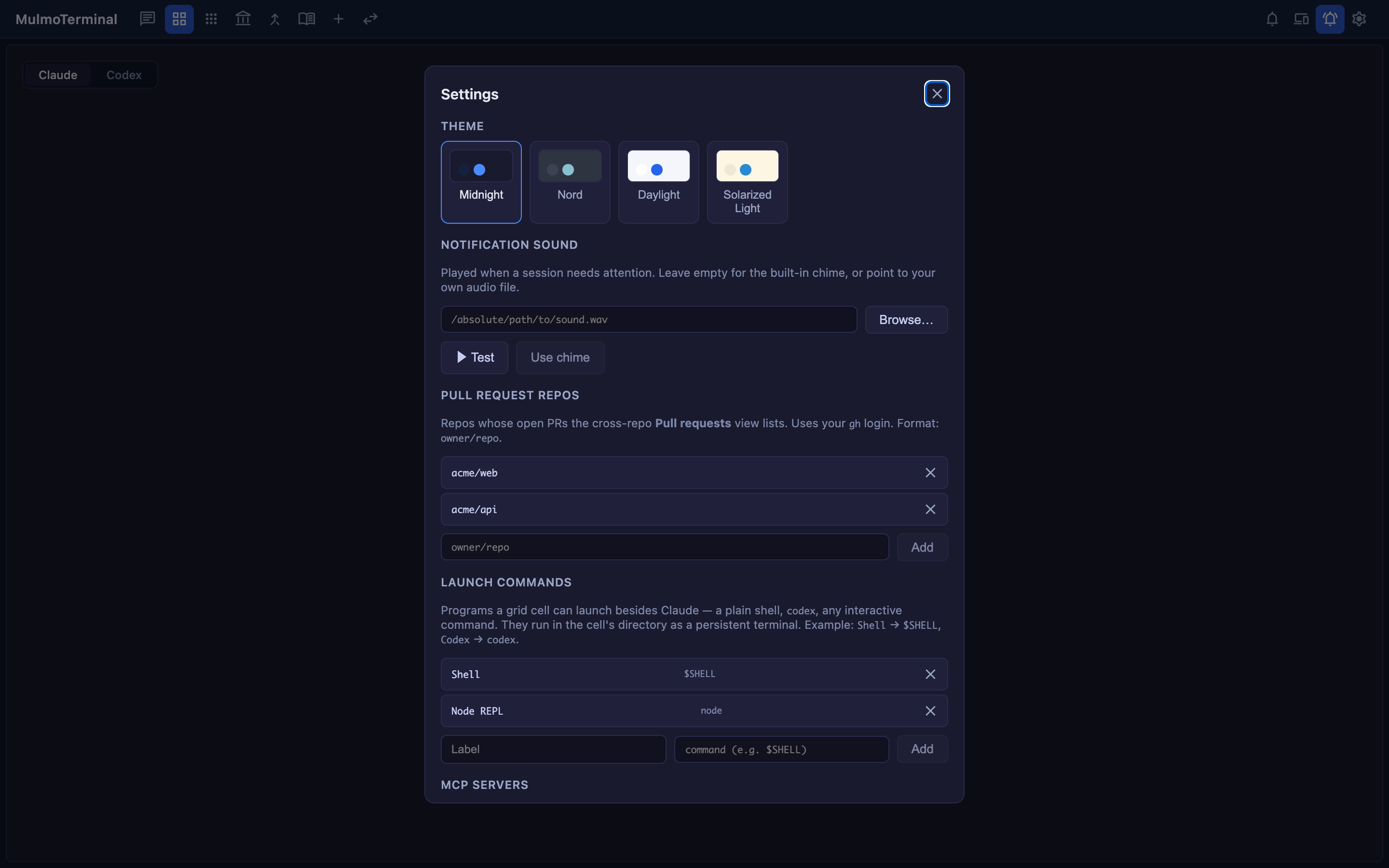
| Item | Description |
|---|---|
| THEME | Midnight / Nord / Daylight / Solarized Light |
| DIRECTORY APPEARANCE | “🎨 Configure appearance…” — set a directory’s name badge, colors, and header interactively |
| NOTIFICATION SOUND | The sound played when a cell needs you (empty for the built-in chime, or any audio file) |
| WEB PUSH NOTIFICATIONS | The “Notify my devices when a task finishes” toggle (off by default → Mobile notifications) |
| GOOGLE ACCOUNT | Google sign-in for the Calendar link (not the RemoteHost Connect) |
| PULL REQUEST REPOS | The repos aggregated by the cross-repo PR/Issue view (owner/repo) |
| LAUNCH COMMANDS | Commands you can launch besides Claude in a grid cell ({ label, command }) |
| MCP SERVERS | Your own MCP servers to add to single-view sessions |
| COST (ESTIMATED) | Estimated cost readouts for Session / Today / Month |
Global config ~/.mulmoterminal/config.json
{
  "cwdPresets": [
    { "label": "acme-web", "path": "/Users/you/projects/acme-web" },
    { "label": "acme-api", "path": "/Users/you/projects/acme-api" }
  ],
  "launchers": [
    { "label": "Shell", "command": "$SHELL" },
    { "label": "Node REPL", "command": "node" }
  ],
  "prRepos": ["acme/web", "acme/api"],
  "userMcpServers": [],
  "buttons": [],
  "chips": null
}
| Key | Role |
|---|---|
cwdPresets | Working-directory chips in the launcher ({ label, path }; click to fill the field, ▶ to launch) |
launchers | The launch commands that appear under “OR LAUNCH” in a grid cell |
prRepos | The repos targeted by the cross-repo PR/Issue view |
buttons / chips | Header buttons / chips (merged with project settings → Customizing the header) |
providers | Anthropic-compatible backends (→ Using another model via OpenRouter) |
soundFile | Custom notification sound (absolute path to an audio file; also settable from the modal) |
pushEnabled | Where the Web Push toggle is stored (default false → Mobile notifications) |
worklogEnabled / worklogIntervalHours | The periodic dev-work log (default off / 6 hours) |
Running on another model (providers)
Claude Code can talk to any Anthropic-compatible backend. The backend goes in providers in config.json, the key in the server’s environment (never in a config file), and the default model in a project’s .mulmoterminal.json — with a per-session override at launch.
{
  "providers": [
    { "id": "openrouter", "label": "OpenRouter", "baseUrl": "https://openrouter.ai/api", "tokenEnv": "OPENROUTER_API_KEY", "maxOutputTokens": 16000 }
  ]
}
Note that baseUrl must not end in /v1, and tokenEnv is the name of a variable, not the key.
→ Full walkthrough, the measured model list, how to add your own models, and troubleshooting: Using another model via OpenRouter.
Per-project .mulmoterminal.json
Place this at the project root to change the appearance, sound, and header of terminals (grid cells) opened in that directory.
Which model to use
{
  "provider": "openrouter",
  "model": "moonshotai/kimi-k2.7-code"
}
The backend and model this directory’s sessions start on. Omit provider and give only model to pick a different model on Anthropic itself. → Using another model via OpenRouter
Name badge and colors
{
  "name": "acme-web",
  "badgeColor": "#2563eb",
  "headerColor": "#0b2545",
  "headerTextColor": "#e6f0ff",
  "cellColor": "#0e1117",
  "cellBorderColor": "#1f6f4f",
  "dotColor": "#22c55e",
  "buttonColor": "#a7f3d0"
}
All values are #rrggbb. The working / needs-you status colors take priority over these background colors (which show when idle).
The terminal itself (xterm palette)
Where headerColor and friends tint the chrome (header / cell frame), colors (and theme) tint the terminal itself (xterm). colors overrides xterm’s ITheme — background / foreground / cursor and the 16 ANSI colors (red, green, …).
{
  "name": "🌌 van-gogh",
  "headerColor": "#0b1a4a",
  "headerTextColor": "#f2e29b",
  "colors": { "background": "#0a1330", "foreground": "#f2e29b", "cursor": "#f5b301" }
}
Set theme to midnight / nord / daylight / solarized for a preset palette; colors layers per-key overrides on top. The color-coding screenshot in Scenario 6 combines header colors with colors to paint each project — from the header down to the terminal body.
Customizing the header (buttons / chips)
This is where MulmoTerminal’s Extend pillar lives. Shape the header of a running terminal to fit your workflow with a small DSL. Any developer can turn their frequent actions into a single click and surface only the information they want to see — that’s what this is for.
Buttons (buttons) — action buttons that act on a running session. Display is an emoji or an icon (a Material Symbol name) plus a label; order controls the sort. With none set, you get the two defaults (📎 insert a file path · 📂 reveal in the file manager); setting buttons replaces that default set.
{
  "buttons": [
    { "id": "compact", "emoji": "🗜️", "label": "Compact", "run": "input", "text": "/compact", "when": "agent == claude" },
    { "id": "gh",      "emoji": "🌐", "label": "Open on GitHub", "run": "open", "open": { "url": "https://github.com/${repo}" }, "when": "isGitRepo" },
    { "id": "reveal",  "emoji": "📁", "label": "Reveal folder", "run": "open", "open": { "reveal": "${dir}" } },
    { "id": "build",   "emoji": "🔨", "label": "Build", "run": "shell", "cmd": "yarn build" }
  ]
}
run: "input"… sendtextto the running Claude/Codex (e.g./compact).run: "open"…url(browser, http/https only) /reveal(OS file manager: Finder/Explorer/xdg-open) /files(in-app explorer) /pickFile(OS file dialog, inserts the path) /terminal(a new terminal cell in that directory) /pr(the current branch’s PR in the browser) /view(diff/prs/wiki/collections/accounting).run: "shell"… runcmdin a command cell (the id is resolved server-side,${variables}are shell-escaped, and the command never reaches the browser).${variables}…dirdirNamebranchreporemoteUrlaheadbehinddirtyagentmodeltasksession.when…isGitRepo/agent == …/repo == …(&&/||, with&&taking precedence).
Chips (chips) — reorder / hide the info chips in a grid cell header, plus custom ones. null (the default) behaves as before.
{ "chips": ["ctx", "git", { "label": "env", "text": "⎇ ${branch}", "when": "isGitRepo" }] }
- Built-in
dir/git/diff/ctx/usage/status/tools… shown in the order you list them; omit one to hide it. - Custom
{ label, text, when }… read-only text (textexpands${variables}).
⚡ Skill menu filter (skills)
The header’s ⚡ Skill ▾ lists the skills available in that directory (<project>/.claude/skills and ~/.claude/skills). Working-dir (project) skills come first, then user-scope ones. Picking one runs the skill in the current session (Claude: /<slug>; Codex: Use the "<slug>" skill.).
Set skills to an allowlist to show only those slugs, in that order. Omit it to show everything.
{ "skills": ["review-diff", "commit-msg"] }
- Skill names (slugs) must start alphanumeric and contain only
a-z 0-9 - _; a slug that doesn’t resolve is ignored.
Scripts <project>/script.json
Your project’s scripts that can run in a grid cell (dev server, tests, build, and so on).
{ "scripts": [ { "label": "dev", "command": "yarn dev" }, { "label": "test", "command": "yarn test", "cwd": "." } ] }
Environment variables
| Variable | Default | Role |
|---|---|---|
CLAUDE_CWD / --cwd | The directory you run npx mulmoterminal in (only ~/mulmoclaude when the server is started directly) | The default working directory (the PTY’s cwd); also set via --cwd |
PORT | 34567 | The server port |
MULMOTERMINAL_HOME | ~/.mulmoterminal | The root for managed git worktrees |