Header reference
- 1.
${variables} - 2.
when— when to show it - 3. Ordering, and how the two files combine
- 4. Chips — putting information in the header
- 5. Filtering the Skill menu
- 6. Recipes
- See also
This page is for looking things up while you write. You are not meant to read it top to bottom.
For your first button — how to read the header, where buttons goes, and the four run types — start at Customizing the header, which walks it through with screenshots.
1. ${variables}
Where they expand
| Expanded | Not expanded |
|---|---|
text on run: "input" | label (the tooltip) |
cmd on run: "shell" (shell-escaped → below) | id |
url / reveal / files / terminal inside open | view inside open (it takes fixed names) |
a custom chip’s text | action on run: "action" (same) |
{ "id": "files", "icon": "folder_open", "label": "Browse this project's files", "run": "open", "open": { "files": "${dir}" } }
The list
Twelve of them. “Empty when” is when the variable expands to an empty string (the variable itself never disappears).
| Variable | What it holds | Example | Empty when |
|---|---|---|---|
dir | the cell’s working directory, absolute | /Users/you/acme-api | never |
dirName | the last segment of dir | acme-api | never |
branch | the branch you are on | feat/1928-docs | not a git repository, or a detached HEAD |
repo | what origin points at. owner/repo on GitHub, host/owner/repo on GitLab (self-hosted included) | receptron/mulmoterminal | not a repository / no origin / a host other than GitHub or GitLab |
remoteUrl | git remote get-url origin verbatim (ssh stays ssh) | git@github.com:receptron/mulmoterminal.git | not a repository / no origin |
ahead | commits ahead of the upstream | 2 | never (it is 0 when there is none) |
behind | commits behind the upstream | 0 | never (0 when there is none) |
dirty | lines of git status --porcelain = how many paths have changes (staged + unstaged + untracked) | 3 | never (0 when clean) |
agent | the cell’s agent: one of claude / codex / antigravity / grok / muse | claude | never (claude when it cannot be told) |
model | the model id the agent’s own log declared on its last turn | claude-sonnet-4-5-20250929 | the agent has not answered yet (just launched) |
task | the task name of a managed worktree — the <task> in ~/.mulmoterminal/worktrees/<repo>-<hash>/<task> | fix-1928 | anywhere else (an ordinary repository checkout) |
session | this cell’s session id (a UUID) | 9f1c…-… | no session has started yet |
isGitRepois not a variable. It is a word you can only use insidewhen; written as${isGitRepo}it does not expand (it stays literal, as below).
An unknown variable stays literal
A typo like ${braneh} does not become an empty string. The text ${braneh} is what you see on screen.
shown: ${braneh} main ← the typo on the left, ${branch} on the right
That is deliberate. Blanking it would read as “nothing is coming through, no idea why”; left literal, the typo is visible where it happens. It is not a bug.
Note that when fails the other way — an unknown name is false and the item disappears. Display errs towards showing the mistake; conditions err towards safety.
Inside run: "shell" they are escaped for you
${variables} in cmd are shell-quoted before the command runs, so a branch name containing ; or $(…) is never interpreted as a command.
{ "id": "pr", "icon": "merge", "label": "Open a PR for this branch", "run": "shell", "cmd": "gh pr create --head ${branch}" }
Only the substituted values are escaped. The command template itself is trusted — it is written in your own config file.
2. when — when to show it
An item whose condition fails is not drawn at all (better than a row of buttons that do nothing). It goes on buttons and on custom chips (a built-in chip is just a string, so it takes no condition).
The forms
| Form | Meaning | Example |
|---|---|---|
isGitRepo | in a git repository | isGitRepo |
!isGitRepo | not in a git repository | !isGitRepo |
var == value | equal | agent == claude |
var != value | not equal | agent != codex |
var != (nothing after the operator) | the variable has a value | repo != |
var == (nothing after the operator) | the variable is empty | task == |
Combine with && and || (&& binds tighter).
{ "id": "compact", "icon": "compress", "label": "Compact this conversation", "run": "input", "text": "/compact", "when": "agent == claude" }
What people get wrong
- Do not quote the value.
agent == "claude"compares against"claude"— eight characters, quotes included — so it is always false. Writeagent == claude. - There are no parentheses.
(isGitRepo || agent == codex)is not an error:(isGitRepois an unknown word, so it is false and the button silently disappears. Rewrite it with&&/||precedence instead. - An unknown word or variable name is false (fail closed).
agnet == claudehides the button. When awhenseems not to work, suspect the spelling first. - Whitespace around the operator is ignored:
agent==claudeandagent == claudeare the same. isGitRepois a standalone word, not a variable —isGitRepo == trueis always false.
An empty right-hand side asks “is there a value?”
repo != means “${repo} is not empty” — that is, a repository name resolved. It is the most useful form in practice, and it applies to the six variables that can be empty: branch, repo, remoteUrl, model, task, session.
ahead / behind / dirty are never empty (they are 0 when there is nothing), so compare them to a number: dirty != 0. dirty != is always true.
Nothing after the operator means “compare against the empty string”, and whitespace around it is ignored — so "repo !=" and "repo != " (with a trailing space) are exactly the same condition. The JSON below is written in the second form.
Example: an Open-on-GitHub button
“Is this a git repository?” and “can a repository name be resolved?” are different questions. Gate the button with when: "isGitRepo" and it also appears in a repository with no remote, or one on a host that is neither GitHub nor GitLab — where ${repo} resolves to empty and the link is a dead https://github.com/. repo != shows it only when a repository name resolved:
{
  "id": "gh",
  "icon": "open_in_new",
  "label": "Open this repo on GitHub",
  "run": "open",
  "when": "repo != ",
  "open": { "url": "https://github.com/${repo}" }
}
The button above is for GitHub remotes only. On a GitLab remote
${repo}is not empty — it carries the host,gitlab.example.com/team/api(see the variable table) — sorepo !=is true and the URL comes out as the wronghttps://github.com/gitlab.example.com/team/api. Where the hosts are mixed, name the repository (repo == owner/name), or use the path menu on the left of the header, which decides from the remote itself.
when is not a security boundary
when decides visibility only. What authorizes a run: "shell" button is that the command is written in your own config file — not that a condition was true.
3. Ordering, and how the two files combine
| File | Applies to |
|---|---|
~/.mulmoterminal/config.json | every terminal |
<project>/.mulmoterminal.json | only cells opened in that directory |
order(a number) sorts them. Buttons without one go last, and equal values keep the order you wrote.- Global and project buttons merge by
id. Sameid→ the project wins; newid→ it’s added. So common buttons can live in the global config and only the project-specific ones in.mulmoterminal.json. - The built-in default set, though, is replaced as soon as either file writes
buttons(→ the trap). chipsdo not merge. If the project has them, the project’s list wins outright.skillsis per-project only (→ the Skill menu).- The caps are 32
buttonsand 16chips; anything past them is dropped silently. - Within one file, a duplicate
idkeeps the first one written.
4. Chips — putting information in the header
chips reorders and hides the info display on row 1, and adds your own. Omit it and the default set stays.
{ "chips": ["git", "ctx", { "label": "Which environment this project deploys to", "text": "env staging" }] }
Only six of them actually respond
| id | Shows | Controlled by chips? |
|---|---|---|
git | branch and unsaved count (⎇ main ●1) | yes |
work | the PR / issue this cell is on (#977 → #966) | yes |
diff | the worktree diff badge (+2 ●5) | yes (worktree cells with changes only) |
ctx | model and context usage | yes (once the agent reports it) |
usage | rate-limit consumption | yes (same) |
env | the values this working tree was reserved — a port shows as a clickable :3010, anything else as its text | yes (only where the project declares worktreeEnv) |
dir / status / tools | project badge / status dot / tool timeline | no — structural: listing them does nothing, omitting them hides nothing |
Writing dir / status / tools is not an error; it is silently ignored.
Custom chips
{ "label": …, "text": …, "when": … } adds a read-only piece of text.
What’s displayed is text; label is again the tooltip — same rule as buttons. ${variables} expand inside text.
{ "label": "Which managed worktree this cell is in", "text": "task ${task}", "when": "task != " }
The env staging on the right-hand cell of the screenshot on the beginner’s page is exactly this.
Once you write
chips, list everything you want. The list you write becomes the whole set, so droppingworkalso drops the PR / issue display.
5. Filtering the Skill menu
The header’s Skill menu (the lightning-bolt icon) lists the skills available in that directory (the project’s .claude/skills first, then ~/.claude/skills; alphabetical within each group, and a project skill shadows a user one of the same slug). Picking one runs it in the current session (/<slug> for Claude, Use the "<slug>" skill. for the other agents).
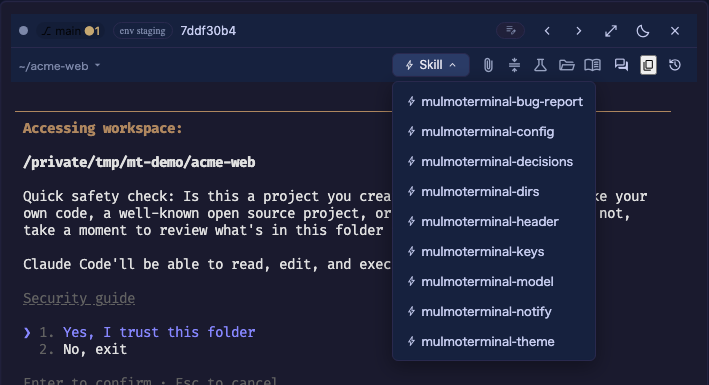
When the list grows unwieldy, skills in the project’s .mulmoterminal.json turns it into an allow-list showing only those slugs, in that order.
{ "skills": ["review-diff", "commit-msg"] }
- Omit it and everything shows.
- A slug that matches nothing is ignored.
- This is a per-project setting. It cannot be written in the global
config.json.
6. Recipes
A .mulmoterminal.json you can paste
Drop it in the project root. It re-lists the two default buttons itself, then adds GitHub, /compact, the tests and a restart, and settles the chips and the Skill menu too.
{
  "buttons": [
    { "id": "pick-file", "icon": "attach_file", "label": "Insert a file path", "run": "open", "open": { "pickFile": true }, "order": 10 },
    { "id": "pr", "icon": "merge", "label": "Open this branch's PR", "run": "open", "when": "isGitRepo", "open": { "pr": true }, "order": 20 },
    { "id": "gh", "icon": "open_in_new", "label": "Open this repo on GitHub", "run": "open", "when": "repo != ", "open": { "url": "https://github.com/${repo}" }, "order": 30 },
    { "id": "compact", "icon": "compress", "label": "Compact this conversation", "run": "input", "text": "/compact", "when": "agent == claude", "order": 40 },
    { "id": "test", "icon": "science", "label": "Run the tests", "run": "shell", "cmd": "yarn test", "order": 50 },
    { "id": "diff", "icon": "difference", "label": "Show what this branch changed", "run": "shell", "cmd": "git diff --stat origin/main...HEAD", "when": "isGitRepo", "order": 60 },
    { "id": "restart", "icon": "restart_alt", "label": "Restart the agent", "run": "action", "action": "restart", "order": 70 }
  ],
  "chips": [
    "git",
    "work",
    "diff",
    "ctx",
    "usage",
    "env",
    { "label": "Which managed worktree this cell is in", "text": "task ${task}", "when": "task != " }
  ],
  "skills": ["review-diff", "commit-msg"]
}
Three things to remember about it:
- Writing
buttonsremoves the two defaults, which is why the first two lines put them back. chipsis likewise the whole list. Dropworkand the PR / issue display goes with it.skillsis a per-project key; in the global config it is ignored.ghis for GitHub remotes only (→ an Open-on-GitHub button).
The same thing split into the global file (~/.mulmoterminal/config.json)
Whatever you want everywhere goes in the global file. The keys are the same; only the location differs.
{
  "buttons": [
    { "id": "pick-file", "icon": "attach_file", "label": "Insert a file path", "run": "open", "open": { "pickFile": true }, "order": 10 },
    { "id": "pr", "icon": "merge", "label": "Open this branch's PR", "run": "open", "when": "isGitRepo", "open": { "pr": true }, "order": 20 },
    { "id": "compact", "icon": "compress", "label": "Compact this conversation", "run": "input", "text": "/compact", "when": "agent == claude", "order": 30 }
  ]
}
The project file then lists only what it adds (a new id is added, a repeated one overrides):
{
  "buttons": [
    { "id": "test", "icon": "science", "label": "Run the acceptance tests", "run": "shell", "cmd": "yarn test:e2e", "order": 40 }
  ]
}
For a directory that is not a git repository
What !isGitRepo is for — offer to make it one, only where it isn’t.
{
  "buttons": [
    { "id": "init", "icon": "add_circle", "label": "Make this directory a git repository", "run": "shell", "cmd": "git init", "when": "!isGitRepo" }
  ]
}
Only in worktree cells
task has a value only inside a managed worktree, so task != is the test for “is this cell one”.
{
  "buttons": [
    { "id": "back", "icon": "keyboard_return", "label": "Open a terminal in this worktree", "run": "open", "when": "task != ", "open": { "terminal": "${dir}" } }
  ],
  "chips": ["git", "work", "diff", "ctx", { "label": "The task this worktree is for", "text": "${task}", "when": "task != " }]
}
See also
- Customizing the header — the beginner’s guide: reading the header, and your first button
- Configuration → customizing the header — where this sits in the config file as a whole
- Configuration → per-project settings — colours, names, ordering: the other keys in the same file
- Worktrees —
task, thediffchip andworktreeEnvfrom the other side - The
/mulmoterminal-headerskill — if you’d rather have it written for you