4.3.0 — The workspace is one place, and an Enter that means 変換
A snapshot of 4.3.0 as released on 2026-08-04. It will go out of date as the app moves on; that is fine and expected. For the reference that is kept current, follow the links to the living guide in each section.
npx mulmoterminal@latest
Nothing here needs configuring. Everything below starts working on upgrade. The one thing worth reading is the tool-name change, because it is visible to the agent and looks like a bug if you do not know about it.
The workspace reaches the same tools however you start a terminal there
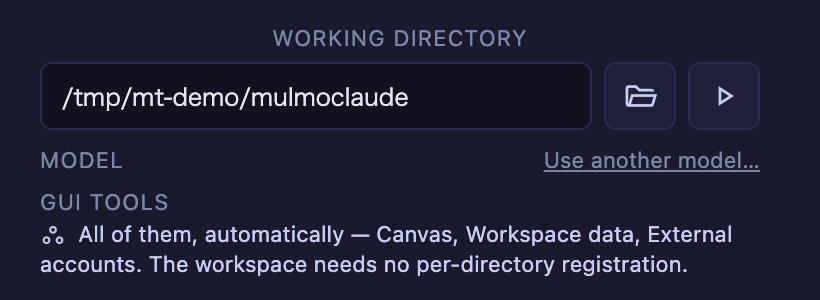
The workspace is the directory MulmoTerminal itself works out of — ~/mulmoclaude unless you said otherwise. It is the one directory where every GUI tool is available without registering anything per-directory.
That was true of a claude cell. It was not true of the others. In the same workspace directory:
| Started as | Before | Now |
|---|---|---|
| a claude cell | every tool | unchanged |
| a codex cell | only the groups registered for that directory | every tool |
a claude launcher chip | nothing — no Canvas at all | every tool |
a codex launcher chip | only the registered groups | every tool |
| any other chip | left alone | left alone |
So the cell beside you could have the Canvas while yours did not, decided by which agent you happened to start.
Nothing to switch on. Point a terminal at the workspace and the launcher tells you what it will get:
Two costs, stated rather than hidden.
- Codex approves MCP servers per server, not per tool. A workspace codex session now auto-approves the whole set in one go — external accounts (Google, X) and the paid generation tools among them. A claude session in the same directory already did; what changed is that the two now match.
- A
claudelauncher chip runs with--strict-mcp-config, so that terminal does not load your own MCP servers from.mcp.json. That is the price of a chip and a cell having the same tools. If you need your own servers in a workspace terminal, start it as a cell rather than a chip.
Reference: configuration in the living guide.
The launcher always offers the workspace
The chip row used to be exactly your recently-used list. That list is filled in as you launch things, and you can delete entries from it — so the most important directory in the app was missing until you had launched there once, and gone for good if you ever pressed its ×.
It is now always the first chip:
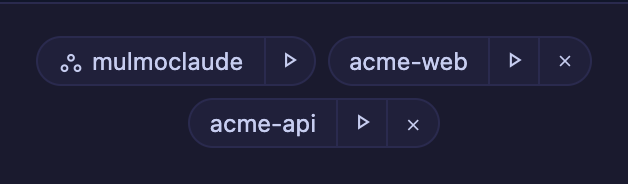
- Always first, ahead of the ordering your
orderPrioritysettings produce — those rank your directories against each other, and the workspace is not in that competition. - Its own icon, and no ×: there is nothing to remove, and removing it would only bring it back on the next render.
- Not duplicated if it is already in your list, and your label is kept — it does not get renamed for having become the workspace.
The frame and background are unchanged on purpose: those already mean “a session is running here”.
Reference: basics in the living guide.
The tool names an agent sees are shorter — and differ by directory
This is the one thing that can look like a breakage if you do not know it.
An MCP client always qualifies a tool with its server id. The workspace / single-view server was mulmoterminal-gui; it is now mt:
| Client | Before | Now |
|---|---|---|
| Claude Code | mcp__mulmoterminal-gui__presentChart | mcp__mt__presentChart |
| Codex | mcp-mulmoterminal_gui-presentChart | mcp-mt-presentChart |
That id is repeated on every tool name, in every listing, for the life of the session, so the seventeen characters were being paid over and over to say what the surrounding config already said.
Only that id changed, and this asymmetry is deliberate:
| Workspace cell / single view | A cell in a project directory | |
|---|---|---|
| Tool name | mcp__mt__presentChart | mcp__mulmoterminal-render__presentChart |
| Who owns the id | us — regenerated per spawn, in no file you keep | you — a key in the .mcp.json you wrote |
The per-group ids are keys in your config files, read back by the launcher’s group switches. Renaming those would break working setups with no error anywhere, so they are untouched. If you see both spellings, nothing is wrong.
Nothing to do. No config of yours refers to mulmoterminal-gui; the app generated it per spawn and never wrote it down. An old entry left in an Antigravity config is still recognised and cleaned up.
Reference: configuration in the living guide.
Enter confirms your IME candidate again
If you write in Japanese, Chinese or Korean, this is the release you want.
In the session note (the pencil on a cell’s header): typing れびゅー, converting to レビュー and pressing Enter to accept the candidate used to save the unconverted text and close the box. The first Enter closed it, so there was no way to recover — you got the wrong note every time.
Escape had the same problem, and worse: mid-conversion it means “drop this candidate”, and it was discarding the whole note instead.
In the terminal, on Safari only, the same Enter submitted the half-converted line to the agent.
Nothing to switch on. Type in Japanese, convert, press Enter — the first press confirms the conversion and the box stays open; the second saves.
Why Safari is called out. Safari fires compositionend before the confirming keydown, so the usual isComposing check is already false by the time anything can look at it. Chrome and Firefox fire it after, which is why the terminal looked fine there. Both are handled now.
Reference: FAQ in the living guide.
Everything else
No action required, but this is most of the release.
- The test suite stopped leaving temp directories in
$TMPDIR— 51 per run, now 0. The machine this was found on had accumulated 42,000 of them. - Three files belonged to no TypeScript project and were checked by nothing — not
yarn typecheck, not CI. All 1,173 tracked files are covered now, verified by planting an error in each of the three. - Docs renamed for what people actually search for (the content was already there), the README now says every cell is a real pty — which is the missing explanation for why the one-session-per-worktree limit applies to agents only — and the hero GIF was retaken.
The full detail, per pull request, is in the changelog.