What changed in 2.6.0
Written on 2026-07-29, as a snapshot of that day. Behaviour moves; this page does not. For the reference that is kept current, follow the links out of each section.
- If you only read one thing
- Long sessions stop looking empty
- The usage gauge cleans up after itself
- Files open with syntax colours
- Your phone can see the session list again
- Smaller things
- Links
If you only read one thing
Upgrade. There is nothing to configure.
npx mulmoterminal@latest
Everything fixed here showed up as something looking empty, not as an error. If any of these look familiar, they are fixed.
| What you saw | Where |
|---|---|
| Your longest sessions had no title, no tool history, and a cost of $0 | Roster / Activity timeline |
| The terminal list showed nothing at all (blank after ~30 seconds) | On your phone |
| The toolbar said Online (green) while your phone said offline | Mac and phone disagreeing |
| A file opened with no syntax colours | The file view |
Long sessions stop looking empty
Nothing to configure.
What was happening
The more you use a session, the bigger its conversation log grows. Past roughly 500 MB, MulmoTerminal could no longer read that log, and treated the session as having nothing in it.
No error appeared. The fields simply went blank. Which means:
The sessions you had used the most were the ones that looked empty.
Those are exactly the ones worth going back to — and they were the only ones you could not read.
How to tell you have the fix
Open your longest-running session and look at its roster row and the Activity timeline.
| Before | After |
|---|---|
| No title, or a blank row | The title and the latest exchange are there |
| Activity timeline empty | The tool history is there |
Cost reads $0 | The real figure |
If your sessions are all short, this never happened to you — nothing changes.
Reference: Feature list
The usage gauge cleans up after itself
Nothing to configure.
The 5h / 7d gauge in the header reads Claude’s numbers by starting one Claude session in the background, briefly. Three things about that session changed.
claude --resume stops filling up with sessions you never started
Those gauge sessions were staying in your history. For the person who reported it, 41 of 50 listed sessions were them.
How to check: run claude --resume in your workspace.
reply with the single character: .
Single character response task
If entries like these are gone, you have the fix. The ones that piled up before you upgraded are cleaned out too, on first launch (once per workspace).
It ends as soon as it has the numbers
It used to keep that session open for about 90 seconds after the numbers had already arrived — and while it did, every open browser asked the server for an update every 6 seconds. Now it ends when the answer lands.
It no longer shows an old figure as if it were current
Each percentage comes with a time when it resets. A figure whose reset time has passed belongs to a window that has already rolled over, so it says nothing about what you have left now. Those are no longer shown.
And when a figure cannot be produced, you get the reason. Where the numbers would be you see claude usage n/a; hover it for one of these:
| What you see | What it means |
|---|---|
the claude command was not found on PATH | claude is not there. Install it and the gauge recovers on its own |
| this account reports no 5h / 7d windows (API-key billing) | By design — API-key billing has no 5h / 7d windows |
| the last check got no answer. Retrying, less often each time | No response: an unanswered trust prompt, an expired login, a slow machine |
Until now, an old figure suppressed that line — so uninstalling claude left yesterday’s number on screen, saying nothing.
One thing to know: this is checked when the gauge refreshes, roughly every 2 minutes. It is not watching a clock second by second, so a figure that lapses while you are away disappears at the next refresh.
Files open with syntax colours
Nothing to configure.
From a grid cell you can open a file and read it inside the app (the file view in the GUI panel). Opening a .vue file there gave you black and white text.
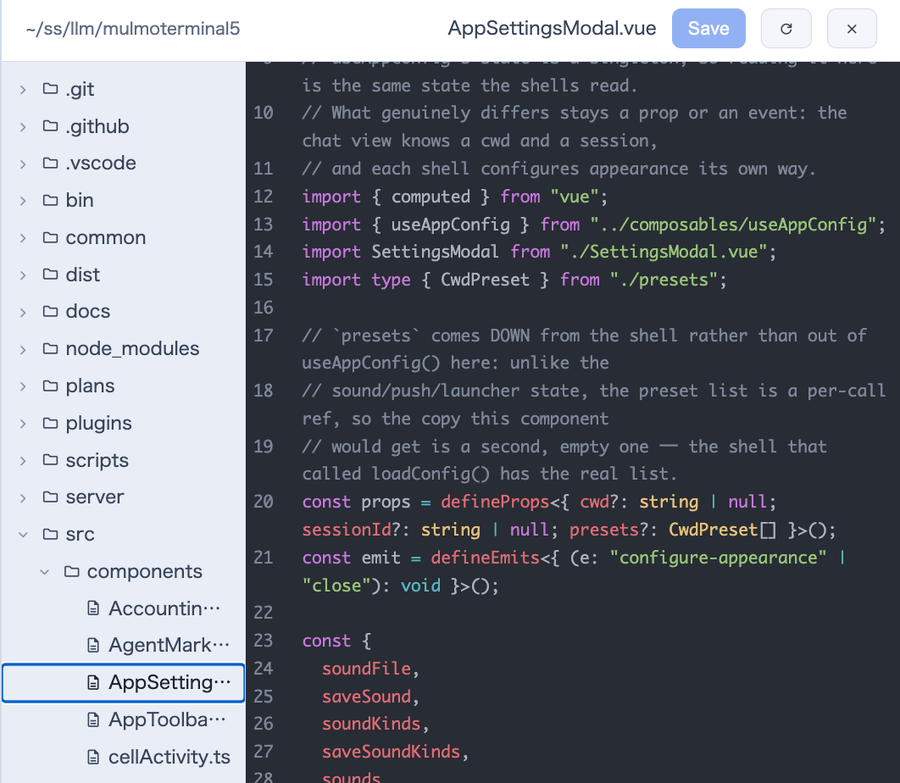
Pick a file in the tree on the left, its name appears in the tab above, and the contents open on the right. In 2.6.0 that .vue file has colours.
Only three kinds had colours — Markdown, JavaScript / TypeScript, and JSON. Everything else opened as plain text, so .py, .rs, .css and .yaml were all colourless too.
Eleven more added:
| Kind | Extensions |
|---|---|
| HTML family | .html .htm .vue .svelte .astro |
| CSS family | .css .scss .less .sass |
| YAML | .yaml .yml |
| XML family | .xml .svg .xsl .plist |
| Python | .py .pyi .pyw |
| Rust | .rs |
| Go | .go |
| Java / Kotlin | .java .kt .kts |
| C / C++ / Objective-C | .c .h .cc .cpp .cxx .hpp .hh .m .mm |
| PHP | .php |
| SQL | .sql |
How to check: open a .vue or .py file. It has colours.
Reference: Feature list
Your phone can see the session list again
Nothing to configure.
If you opened the terminal list on your phone and got nothing — not a short list, nothing, after about 30 seconds — this is the fix. A field added in 2.5.3 meant the list never reached your phone at all.
How to check: open the phone view. The list is there.
And a host that has gone quiet now says so
The Mac’s toolbar could stay Online (green) while your phone said offline, and keeping the tab open made no difference.
The Mac now notices that its own status has stopped reaching your phone and turns red, so both ends agree. Not getting through is now visible as not getting through.
Reference: Using it from your phone · Mobile notifications
Smaller things
- The docs and
init’s closing hint now all saynpx mulmoterminal@latest. Without@latest,npxcan run a copy it downloaded earlier — the most common reason for “I upgraded and nothing changed”. - One Windows CI fix (no effect on anyone using the app).
Links
- Full list of changes: ChangeLog
- Every setting: Configuration
- What each feature does: Features