What changed in 2.9.0
Written on 2026-07-31, as a snapshot of that day. Behaviour moves; this page does not. For the reference that is kept current, follow the links out of each section.
- If you only read one thing
- Tell “it needs you” apart from “it finished”
- When the browser is blocking your attention sound, the toolbar says so
- Antigravity conversations survive a restart
- Windows: folders with non-ASCII names
esc-crhosts: slash commands and first prompts- Nothing else to do
If you only read one thing
Upgrade. Everything here is on by default and there is nothing to configure. The one setting this release adds is already on; the only reason to open Settings is to turn it off.
npx mulmoterminal@latest
| What you get | Where |
|---|---|
| A row stuck on a permission prompt looks different from one that merely finished | Cockpit roster, sidebar, tab bar |
| A Waiting rows switch, if the blinking is not for you | Settings |
| The toolbar tells you when the browser is blocking your attention sound | Toolbar |
| Sessions you were not told about carry a mark until you look | Status dots |
| An Antigravity conversation survives a server restart | Antigravity sessions |
| What was broken, and is fixed | Where |
|---|---|
| Notifications that arrived while audio was blocked were lost — or all fired at once | Attention sound |
| A folder with a non-ASCII name opened the default directory instead | Windows, 📁 picker |
| A directory that could not be used was silently replaced by the default workspace | Any terminal |
Slash commands could not be sent from the phone on esc-cr hosts | Remote host |
A session started with a first prompt never sent it on esc-cr hosts | Skill buttons, collections |
Tell “it needs you” apart from “it finished”
Three panels list your sessions: the cockpit roster (beside a zoomed cell), the sidebar and the tab bar. All three used to mark a session that “needs attention” the same way — whether the agent was stopped on a permission prompt and cannot continue without you, or had simply finished a turn you have not read yet.
Those are now different colours everywhere: amber = waiting for you, green = finished, unread.
In the cockpit roster
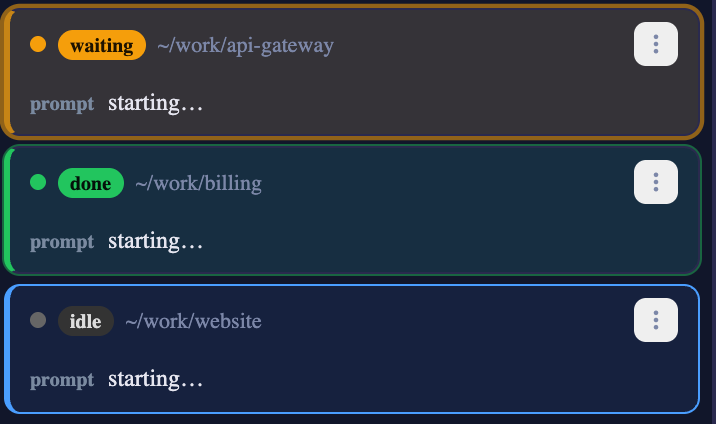
| State | How it looks | How loud |
|---|---|---|
| Stopped on a permission or a question | Amber ring, amber leading line, faint amber tint — and it blinks | Strong |
| Finished a turn, output unread | Thin green ring, green leading line, very faint tint. No motion | Quiet |
| Working / idle | Unchanged | — |
The row you are looking at never joins in. The zoomed cell’s own row keeps its blue leading edge even when it is blocked, so the thing you are reading does not flash at you.
In the sidebar and the tab bar
The same split arrives as a dot, in the slot the working spinner uses:
- Amber dot — Waiting for you. Before 2.9.0 the sidebar showed this with bold text and nothing else, and the tab bar with a red dot.
- Green dot — Finished — unread. Previously identical to the above in both panels.
Bold stays on both kinds. Bold means “your attention”, which is exactly what the Unread chip filters on — the colour is what tells you which kind of attention. There is no blinking here, and no setting for one: the sidebar and tab bar are on screen all the time, so constant motion in them would be far more tiring than in the roster.
If the blinking is not for you
- Open Settings (the gear, top right).
- Find Waiting rows and uncheck it.
The colours stay; only the motion stops. The setting lives in your browser’s local storage, next to font size and scroll speed — so it is per device and does not sync.
If your OS is set to reduce motion (prefers-reduced-motion), nothing blinks regardless of this setting.
Reference: Feature reference · Configuration
When the browser is blocking your attention sound, the toolbar says so
A browser will not play a sound until you have interacted with the page. That is Chrome’s autoplay policy and no application can opt out of it. What MulmoTerminal can do is stop lying about it.

How to tell, and what to do
- The bell now has three states, not two: on, off, and blocked. Blocked is highlighted and its tooltip reads Attention sound blocked — click anywhere to enable.
- Click anywhere on the page. That single gesture is all the browser wants. The most recent notification you missed plays once — not the whole backlog at once, which is what used to happen.
What was actually wrong
If you ever thought “the sound never came back”, it was really “they all arrived together”. While audio is suspended a browser freezes the audio clock at zero, and every held beep had been scheduled against it — so on your first click they all ended at the same instant, on top of the test beep, indistinguishable from one sound. Nothing is scheduled while audio is not running now.
The mark on a status dot
A session whose notification could not be announced keeps an unacknowledged ring on its status dot until you deal with it. That includes a session that was already waiting when you loaded the page — that one never beeps even with sound working, because the first reading is the baseline.
The ring clears when the session stops waiting, when it closes, or when you zoom its cell. There is no button to dismiss it by hand.
Reference: Mobile notifications · Feature reference
Antigravity conversations survive a restart
Nothing to configure. If you use Antigravity (agy), this is the fix worth knowing about.
agy invents its own conversation id and does not print it anywhere we can read, so MulmoTerminal watches its brain directory and claims the new conversation after the session starts. Until now that mapping lived only in memory: restart the server and the conversation was still on disk with nothing pointing at it.
How to tell you have the fix
- Start an Antigravity session and let it answer once.
- Restart MulmoTerminal.
- Reconnect to that session. It picks up the same conversation.
The record is appended to ~/.mulmoterminal/antigravity-conversations.jsonl — one line per session, holding the session key, the conversation id and the directory. Deleting the file costs you the ability to resume those conversations; it cannot make MulmoTerminal open the wrong one, because the resume still refuses any id that matches no conversation on disk.
Reference: Feature reference — agents
Windows: folders with non-ASCII names
Only affects Windows. If you picked a folder with Japanese, Chinese, Korean, Cyrillic or accented Latin characters in its name using the 📁 button, the terminal opened in your default workspace instead, with no error.
The picker’s PowerShell writes piped output in the OEM code page — CP932 on Japanese Windows — while MulmoTerminal decoded it as UTF-8. Only the non-ASCII part was mangled; the C:\ prefix survived, so the broken path looked absolute enough to pass every check on the way in.
How to tell you have the fix: pick a folder whose name is not plain ASCII. The terminal opens in it. Before 2.9.0 it opened somewhere else.
And if a directory genuinely cannot be used, you are now told — a named directory that does not resolve no longer turns into the default workspace behind your back.
Reference: Configuration
esc-cr hosts: slash commands and first prompts
Only affects hosts configured with terminalSubmit: "esc-cr". If you have never set that, skip this section.
Two dead ends are fixed:
- Slash commands from the phone. While the cursor sits at the end of a
/commandor an@path, Claude Code keeps its completion menu open, and in that stateescapedismisses the menu — so theESCof anESC CRsubmit was eaten and the line stayed in the box. Ordinary prose was never affected, which is why this looked like “skills are broken” rather than “submit is broken”. The same dead end existed in the browser’s own Skill menu, and both are fixed. - A session started with a first prompt. Skill launch buttons and collection actions start a session with an initial prompt; the server-side path that types it had
\rhard-coded, which on anesc-crhost is a newline, not a submit.
How to tell you have the fix: on such a host, press a Skill button. The command is sent instead of sitting in the input box.
Reference: Configuration — terminalSubmit
Nothing else to do
Everything above is on after an upgrade. The internals moved a lot in this release — Settings, the remote-host handlers, the grid’s launch form and the wiki’s rendering were all split up, and two guardrails were added so files cannot silently grow past 600 lines or go unreferenced again — but none of that changes what you see.
If something looks wrong, type /mulmoterminal-bug-report in any session: the bundled skill reads your real config and version, works out whether the behaviour is configuration or by design, searches the existing issues, and only helps you file one if none of that explains it.