4.3.1 — The workspace chip says WORKSPACE
A snapshot of 4.3.1 as released on 2026-08-04. It will go out of date as the app moves on; that is fine and expected. For the reference that is kept current, follow the links to the living guide in each section.
npx mulmoterminal@latest
Nothing to configure. This is a polish release on the day 4.3.0 shipped — one label, and one bug behind the header chips. If you have not read the 4.3.0 page yet, read that one first; everything here assumes it.
The workspace chip now names its role
4.3.0 made the launcher always offer the workspace as its first chip. It labelled that chip with the folder name — mulmoclaude, or whatever CLAUDE_CWD points at.
That was the least interesting true thing to say about it, and it made the chip look like one project sitting among the others. Every other chip is a place: the basename of a directory you have launched in. This one is a role — the base a session works from, the only directory where every GUI tool is available, where the shared wiki, collections and accounting live.
So it says what it is:
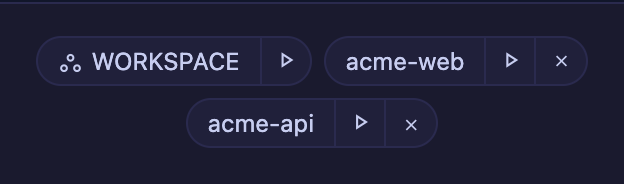
Nothing to do. Upgrade and the chip renames itself.
- Upper case, because its neighbours are lower-case basenames — so it does not read as a directory name either.
- It overrides your label. 4.3.0 said a workspace already in your recently-used list keeps the name you gave it. For this chip the role is worth more than the name, so the role wins now.
- The path is still in the hover, the same place every other chip keeps it.
- A screen reader hears something different from the label. The other chips say where they go by saying their directory; this one does not, so it announces
the workspace, <path>.
Reference: basics in the living guide.
The git chip refreshes when you come back to the tab
Small, and you may never have noticed it — but it is the kind of thing that makes a header quietly untrustworthy.
The branch / dirty / ahead-behind chip refreshed when the window regained focus. Switching between browser tabs fires a different event, which it was not listening for. So returning to a MulmoTerminal tab showed the branch as of whenever you left, until the next ten-second tick caught up.
The PR chip beside it already handled this. Both now share one implementation, so they cannot disagree again.
How to tell you have it. Switch to another browser tab, change branch in a terminal outside the app, and switch back — the chip is already right rather than right ten seconds later.
Reference: basics in the living guide.
The full detail is in the changelog.