4.5.0 — what to set up
A snapshot written on 2026-08-05, for MulmoTerminal 4.5.0. Behaviour described here is what shipped that day; the living reference is Configuration, which is kept current.
Four things in this release need setting up, and this page walks each one:
| A repository’s own icon and colour | repo.json — one file any tool can read |
| A port and a database per worktree | so two yarn dev stop fighting over 3000 |
| Grok, and agents you configure | the Agent Picker grew |
| Settings you can now reach | twelve keys that needed hand-edited JSON |
A repository’s own icon and colour
Nine cells of the same dark grey, and the only way to tell them apart is to read the path. 4.5.0 gives a repository a way to say what it is — a name, a mark, a colour — in a file any tool can read.

The mark on the left of each header comes from the repository itself. Neither cell was configured in MulmoTerminal.
The short version
Put a repo.json at the root of your repository:
{
  "name": "diffusion-lab",
  "description": "Training and evaluation for latent diffusion models",
  "icon": "docs/logo.png",
  "color": "#7c3aed"
}
Save it. The cells recolour immediately — no restart, no page reload, as long as the file was written by an agent’s Write/Edit tool. Edited by hand from outside, it applies on the next reload.
That is the whole procedure. The rest of this page is what each field does and where the values go.
What you get for each field
name | The badge on the cell header, the roster row and the launcher chip. |
icon | The mark at the left edge of the header — the browser-tab position, because that is where you look first. Also on the roster, the filmstrip and the launcher chips. |
color | All seven chrome colours. See below. |
description, homepage, authors | Not shown by MulmoTerminal today. They are part of the open format, for other tools. |
One colour becomes seven
You write one. The header takes it exactly; the badge, border, status dot, buttons and cell body are derived from its hue; and the header text is derived for contrast — never declared, so it is readable whatever colour you pick.
If you want the three-role form instead:
"color": { "primary": "#7c3aed", "accent": "#22d3ee", "background": "#0b1020" }
background sets the cell body directly. accent is part of the format but MulmoTerminal has nowhere to put it yet.
Only #rgb and #rrggbb. "blue" and rgb(1,2,3) are ignored — and ignored cleanly: an unusable colour leaves the derived one in place rather than blanking the cell.
Icons
A string, or an array when you have several sizes:
"icon": [
  { "src": "docs/logo.svg", "sizes": "any" },
  { "src": "docs/logo-192.png", "sizes": "192x192" }
]
Vectors win, then the largest, then whichever you listed first. An entry that does not resolve is skipped — one dead path does not hide the working ones after it.
PNG, JPEG, animated GIF, WebP, AVIF, SVG, ICO, BMP. A path is relative to repo.json and must stay inside the repository; an http(s) URL or a data: image also works.
If you already have a favicon, you may not need any of this
A directory that sets no icon anywhere shows the one its repository already ships — public/favicon.svg, apple-touch-icon.png, a web manifest. That has been on since 4.5.0 and needs no configuration. Turn it off in Settings → Directory appearance, or per project with "icon": false.
Keeping your own settings on top
repo.json is the lowest layer. Two files above it stay exactly as they were:
repo.json  →  .mulmoterminal.json  →  .mulmoterminal.local.json
the project    your settings          this checkout
So a project’s brand colour applies until you override it, and your own palette wins when you do. Anything MulmoTerminal understands that the open format doesn’t — theme, orderPriority, sound — goes under extensions.mulmoterminal inside repo.json, or in the files above it.

The chips too, so you can tell where you are about to start before you start it.
How to tell it worked
Open Settings → Directory settings and expand the project. It names every file it read, in the order they apply, and lists which keys each one contributed — including the colours derived from color. If a value is not what your file says, this is where you find out which layer won.
What breaks
- Nothing, if you write no file. Every field is optional and an empty
repo.jsonis valid. - A path that leaves the repository is refused —
../../elsewhere.pngshows nothing rather than reading a file the project never should have named. - A written-but-wrong icon shows nothing, and does not fall back to the favicon. That is deliberate: a broken setting should look broken. Check Settings → Directory settings, where the key appears under the ones that were dropped.
- On a Mac, nothing special. No permissions, no restart.
The format itself
repo.json is not a MulmoTerminal file. The specification is written to be readable by any tool that displays repositories — terminals, IDE tab colours, project switchers, dashboards — so a repository states its identity once and every tool agrees.
If you maintain a repository, adding one costs four lines and is not wasted on this app alone.
A port and a database name per worktree
A git worktree isolates your files. It does not isolate port 3000. Run yarn dev in one tree and again in another and the second one dies; point five trees at one local database and whichever runs a migration breaks the rest.
Declare what each tree should have of its own, in the project’s .mulmoterminal.json:
{
  "worktreeEnv": {
    "PORT": { "kind": "port", "base": 3000 },
    "DB_NAME": { "kind": "slug", "prefix": "acme_" }
  }
}
MulmoTerminal reserves a value per tree and passes it as an environment variable to every terminal in that tree — Claude cells, Codex cells, shells, launcher chips, Run commands. Nothing in your dev script changes; it reads PORT as it already does.

The env chip on the header. :3010 is a link — click it and the tree’s dev server opens.
What each tree gets
| kind | you get |
|---|---|
port | base, then base + 10, base + 20… — stride 10, because Vite and friends quietly move to the next free port when yours is taken, and a stride of 1 lands that escape on the neighbouring tree’s number |
slug | prefix + the tree’s task name, made safe for an identifier — acme_fix_login |
The main checkout gets the first value (3000, acme_proj), so it is not a special case.
A port is probed once, when it is first handed out — not on every launch, or a tree would run away from its own dev server. The reservations live in ~/.mulmoterminal/worktree-env.jsonl.
Telling it worked
The env chip on the cell header. It is a built-in chip, and it renders nothing at all for a project that declares no worktreeEnv — so if you see no chip, the config is not being read. If you want the raw answer, echo $PORT in that tree’s terminal.
Grok, and agents you configure

Grok joins as a fourth first-class agent. Pick it in an empty cell and you get a real session: it resumes across a reload and a server restart, it carries the GUI MCP tools its directory registered, and it wears a badge in the tab bar like the others. Nothing to configure — it appears if the grok CLI is on your PATH.
Your own way of starting Claude Code
The picker can also hold commands you write. In ~/.mulmoterminal/config.json:
{
  "customAgents": [
    { "id": "ollama", "label": "Ollama", "agent": "claude", "command": "ollama launch claude --model qwen3:32b --" }
  ]
}
That entry appears in the picker beside the built-ins. It is not a launcher chip: Claude Code’s own arguments are appended to your command, so the cell still resumes, still reports cost and still reaches the GUI tools like any other Claude session. agent says whose arguments to append and is required — an entry without it is dropped.
The difference matters, and it is the whole reason this is a separate thing from a launcher chip: a chip runs your command line verbatim and nothing parses it. As of this release the parser that used to recognise claude or codex in a chip and quietly rewrite it is gone.
Settings you can now reach
An inventory of the 27 global settings found twelve with no control anywhere and nine that no skill documented. The only way to set them was to read the guide and hand-edit JSON.
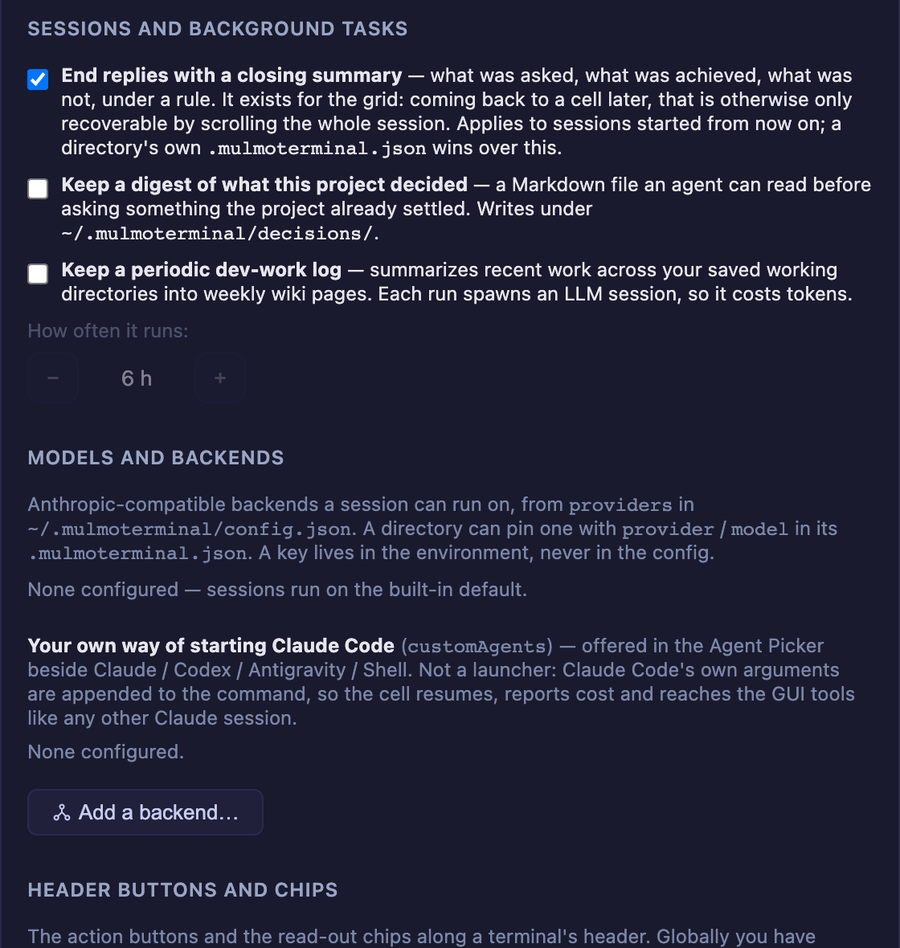
Now in Settings: the closing summary, the decision digest, the periodic dev-work log and its interval, work comments on issues, the PR clone footer, a self-hosted GitLab host, roster row lengths, terminal keys and Enter behaviour, and copy-on-select.
Five settings deliberately did not get a form — keymap, themes, providers, customAgents, and header buttons / chips. A form makes it too easy to bind a key that steals a shortcut, or name an API key from the wrong environment variable, or build a button that does nothing. Those sections show you the current value and a button that launches the skill which knows the rules.
A test now fails when a new global setting is added without saying where a user can set it, so this gap cannot silently reopen.
Plugins
@mulmoclaude/markdown-plugin moved to 2.2.0 and html-plugin to 2.1.0. Both are dependency bumps with no source changes here — nothing to set up, and the Canvas renders as before.