4.7.1 — The version you are running, on screen
A snapshot of 4.7.1 as released on 2026-08-07. It will go out of date as the app moves on; that is fine and expected. For the reference that is kept current, follow the links to the living guide in each section.
npx mulmoterminal@latest
Nothing to configure in this release. Everything below is on the moment you run 4.7.1.
Settings says which build you are running
Open Settings (the gear in the toolbar). Under the title there is now a Version row.
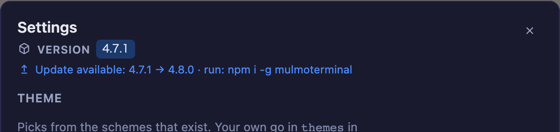
That is the whole feature: the number to quote in a bug report, without leaving the app. Until now the only way to answer “what am I on?” was npx mulmoterminal@latest --version in another terminal, and the header’s Update badge only appeared when something newer existed — it never named the version you had.
What it shows depends on how you installed
Installed from npm (npx mulmoterminal, npm i -g mulmoterminal) — the version from the shipped package.json, and when the registry has something newer, the same notice the header badge carries, command included. The badge is behind the modal while it is open, so the row repeats it.
Running a git checkout — the version and the commit:
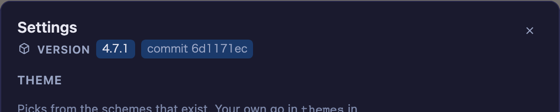
The commit is the part that matters there. A checkout’s package.json says whatever was last released, so it is the same 4.7.1 on the release commit and fifty commits later; the short HEAD sha is what identifies the build you are actually running.
If you silenced update notices
MULMOTERMINAL_NO_UPDATE_CHECK=1 and NO_UPDATE_NOTIFIER=1 still do what they always did — no console notice, no header badge, and no network request. The Version row is not affected. The switch was there to stop the nagging, not to hide which build you are on, and the probe that reads the version and the commit never leaves your machine.
How to tell you have it
Open Settings. If the row under the title reads VERSION 4.7.1, you have it.
Every agent wears its own mark in the picker

The Agent Picker was six words in one weight; nothing on it said which tool a button starts. Each built-in agent now shows the same shape it wears everywhere else in the app — Anthropic’s burst, Codex’s crossed loops, Antigravity’s four-point star, Grok’s broken X, Muse’s M.
The two options that are not agents get a plain icon instead: Shell a terminal, and a custom agent a slider. A custom agent deliberately does not get Claude’s burst even though it runs Claude Code — a row you cannot tell apart from the Claude row is the thing this change was fixing.
Nothing to turn on, and no behaviour changed.
A long seed prompt no longer kills the session
If you launch a cell with a skill — the seed prompt MulmoTerminal writes into the new session — this release fixes two ways that could fail. Both are on by default and need no configuration.
Too long, on any platform. A persistent session starts through tmux new-session -A … -- <bin> <args>, and tmux refuses a command line past a limit that is shared by everything on it. Over that limit tmux answered command too long and the session died, not just the argument. Measured on tmux 3.7b: one 16,375-byte argument fails, and two 10,000-byte arguments fail together — the budget is the whole command line, not one argument.
A seed over 4,096 bytes is now written to a file and the command line carries one line pointing at it. Bytes, not characters: tmux counts bytes, and Japanese is three bytes per character, so 2,000 Japanese characters (6,000 bytes) goes to a file while 2,000 ASCII characters does not.
Newlines, on Windows. grok, antigravity and muse put the seed straight on the command line, and a Windows command line cannot carry a newline — so a .cmd install failed with UnsafeArgumentError every time a skill was launched with an argument. On Windows a multi-line seed now goes to a file too.
Outside those two cases nothing changed: your agent still receives the prompt exactly as before. When a file is used, the agent’s first action is to read it.
Reported by @chikara813.
Also in this release
- Two duplicate-code alerts closed (#1523) — the guards in front of collection record actions were copied between the parent route and the view-token route, which is how the two drift apart on an authorization check. They are one shared module now. No behaviour change; same statuses, same wording, same per-route ordering.
Links
- Configuration — the Settings modal, section by section
- Which coding agent — all five, kept current
- Basics — how to read the screen — the launcher form and the picker
- Changelog — every release, with the pull requests