4.5.1 — A backend with no models says so
A snapshot of 4.5.1 as released on 2026-08-05. It will go out of date as the app moves on; that is fine and expected. For the reference that is kept current, follow the links to the living guide in each section.
npx mulmoterminal@latest
Nothing to configure — with one exception. If you registered a backend under an id other than openrouter, it needs one line adding, and this release is what finally tells you so.
The MODEL list stops offering what it cannot run
What was broken. A backend registered in providers appeared in the launch form’s MODEL dropdown and could not be selected — not by a click, not with the arrow keys (#1432).
It was never an option. A provider with no models rendered as a group header with nothing under it, and a browser draws that as a shaded row that the mouse and the keyboard both skip.
Why a backend ends up with no models. The measured model list belongs to OpenRouter alone — it is matched by the provider’s id, so a provider registered as deepseek, moonshot or a company gateway starts with nothing, and must list its own. A session cannot start on it either: naming a provider without a model is refused at launch.
What you see now. The provider is left out of the list, and the link beside the MODEL label changes to Needs attention:

Open it, and the reason is the first thing in the panel:
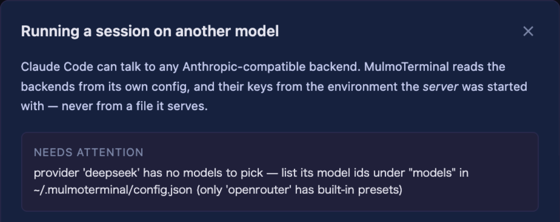
What to do. Add the model ids you want to run to that provider’s entry:
{
  "providers": [
    {
      "id": "deepseek",
      "label": "DeepSeek",
      "baseUrl": "https://api.deepseek.com/anthropic",
      "tokenEnv": "DEEPSEEK_API_KEY",
      "maxOutputTokens": 16000,
      "models": ["deepseek-chat", "deepseek-reasoner"]
    }
  ]
}
Restart the server. Each id appears under that backend’s name, marked not tested — meaning nobody measured it, which is more honest than implying somebody had.
If you already wrote models and the picker still offers none, every id in it was refused. A model id may contain letters, digits and . _ : / - ~ — so an object like {"id": "…"}, a value with a space, or a models that is not an array is dropped. It used to be dropped in silence; the server now names what it dropped, on the terminal it was started from:
[providers] 'deepseek': dropped 1 unusable model id(s) — {"id":"deepseek-chat"}. A model id is letters, digits and . _ : / - ~.
Settings → Models and backends says the same thing in a word: a reachable backend with nothing to pick reads not in the picker rather than ready.
Reference: providers in the living guide.
Choose a folder… works without zenity
What was broken. On a Linux desktop or under WSL2 without zenity installed, the launch form’s Choose a folder… button did nothing at all — no dialog, no message (#1447). The server tried exactly one program, and every caller in the UI threw the failure away.
What happens now.
| host | what opens the dialog |
|---|---|
| macOS | osascript (built in) |
| Windows | PowerShell (built in) |
| WSL2 | the Windows dialog over interop — powershell.exe, with the path converted back by wslpath. Nothing to install |
| Linux desktop | zenity → kdialog → qarma → yad, whichever is there |
And when there is none, it says so instead of appearing broken — you type the path in the field as before. npx mulmoterminal@latest init now reports, on Linux, which dialog this host has.
What to install, if you are on a plain Linux desktop with none of them:
sudo apt install zenity     # Debian / Ubuntu
sudo dnf install zenity     # Fedora
kdialog, qarma and yad work equally well — if your desktop already ships one, there is nothing to do.
Reference: getting started in the living guide.
The launch form’s controls have a width again
Nothing to configure. 4.5.0’s form capped every row at 360px, so a wide cell drew a narrow column — 25 directory chips wrapped into 20 rows inside 360px while the cell was 1535px wide. That cap was removed, which fixed the chips and stretched everything else: at a 1535px cell a checkbox sat most of a screen away from its label.
So the two are now separate. Directory chips take the whole cell — they tile, so width buys rows back. Every other control shares one 560px cap, wide enough for a long path with a worktree task name beside it, narrow enough that a checkbox stays next to its label.
Reference: basics in the living guide.
How to tell you have it
npx mulmoterminal@latest --version
4.5.1. If the MODEL dropdown still shows a backend you cannot click, you are on an older build — npx caches, so @latest is what forces the fetch.