4.7.3 — Buttons that say they are working
A snapshot of 4.7.3 as released on 2026-08-08. It will go out of date as the app moves on; that is fine and expected. For the reference that is kept current, follow the links to the living guide in each section.
npx mulmoterminal@latest
One thing to decide in this release, and it is a checkbox: whether pressing Enter should take a scrolled-up terminal back to the latest output. It is on by default — see Return to the latest output when you send. Everything else is on the moment you run 4.7.3, with nothing to configure.
The bug this release is built around
+ New worktree looked like it did nothing, so people pressed it again — and got another worktree.
git worktree add checks out the whole tree. On the reporter’s monorepo — around 33,000 files — that is about six seconds, and for all six the launcher looked identical to the moment before the click. No spinner, no disabled button, nothing. So it got pressed again, and again, and each press succeeded: agent/fix-login, agent/fix-login-2, agent/fix-login-3, three copies of the same working tree.
The same missing line hid failures. A create that the server refused showed nothing at all — the reporter’s real cause was a base branch that did not exist locally, and finding that out took reading the shipped JavaScript bundle.
What it looks like now
Press it once and the button holds itself, spins, and says what it is doing. Press it again and nothing happens, because there is nothing to press.

The same rule now covers every control in that section, because they all run git in one repository: the worktree rows, and the delete button beside each one. Whichever you pressed spins; the rest are simply held until it finishes.
And when the server refuses, it says so, in the server’s own words:
fatal: Not a valid object name: ‘main’.
The message appears under the worktree section, the task name stays in the field so you can try again, and the button comes back. Nothing to configure — this is how the launcher behaves as of 4.7.3.
If you hit the
Not a valid object namecase: it means the branch a worktree forks from is not checked out locally.git branch main origin/mainin the repository fixes it. This can happen after you remove a worktree that hadmainchecked out with “delete the branch” — see Worktrees in the guide.
Closing a worktree now looks like closing a worktree
Removing a worktree runs git worktree remove, which on a large repository takes just as long as creating one — and the cell used to sit there looking completely alive while it ran.
Now the whole cell greys out, header included, behind one spinner naming what is going:
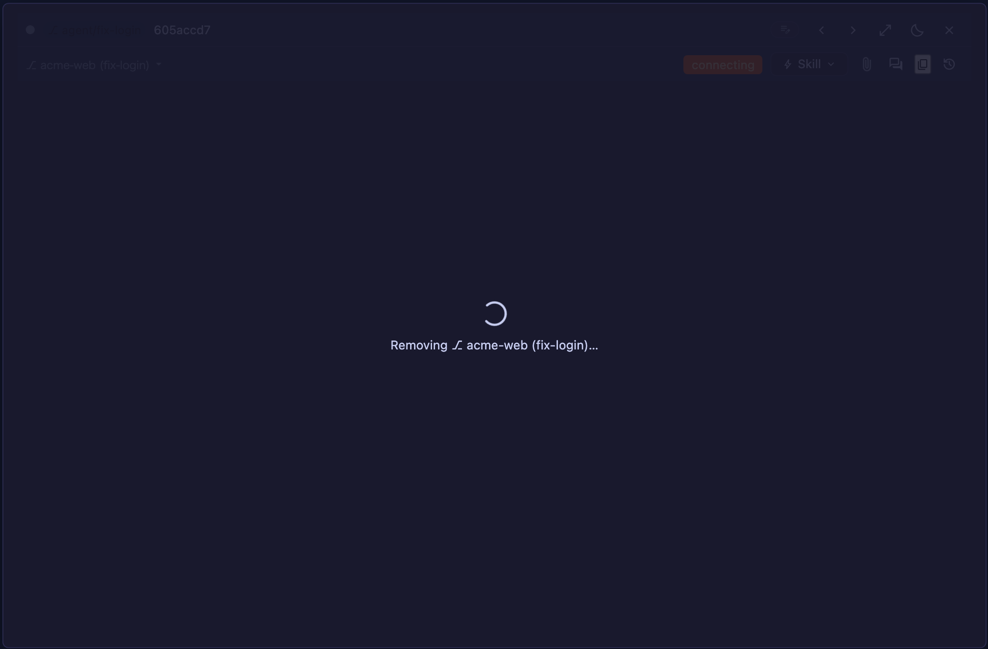
While it runs, nothing in that cell can be clicked or reached with the keyboard — the confirmation cannot be dismissed part-way, because by then the terminal has already been ended and the branch is being deleted. If the removal fails, the confirmation comes back with the reason, and you can retry or close the cell.
Nothing to configure. See Worktrees for what a worktree is and when to reach for one.
Return to the latest output when you send
This is the one thing in 4.7.3 you may want to change.
Scroll up in a Claude Code cell to read something, then press Enter. Until now you stayed where you were — which is not what an ordinary terminal does, and not what a shell cell in MulmoTerminal does either. The difference is real: a full-screen agent like Claude Code owns its own scroll position, so there was nothing on our side to send back down.
What 4.7.3 does is unwind exactly the scrolling you did. MulmoTerminal is what synthesised those wheel events in the first place, so it counts them and sends the same number back down when you send. If you have not scrolled, not a single byte goes anywhere.
It is on by default. To turn it off: Settings (the gear in the toolbar) → Terminal scroll speed → the checkbox underneath.
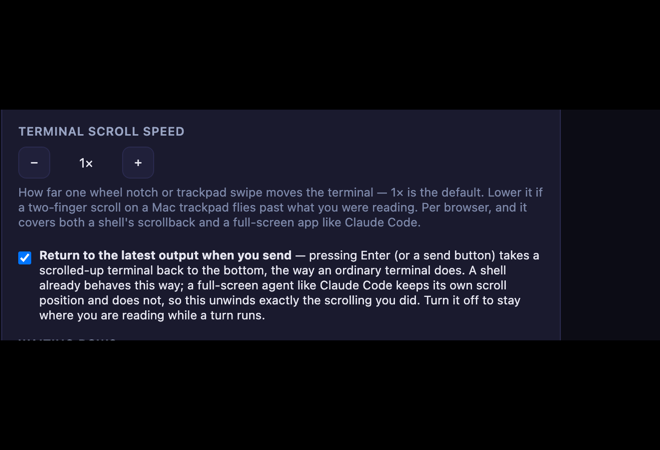
The setting is per browser, like the scroll speed above it — it lives in that browser’s local storage, so your laptop and your phone can disagree, and it does not travel to another machine.
Turn it off if you like to read back through a turn while it runs and do not want the view jumping to the bottom when you send the next message.
How to tell it is working: open a Claude Code cell with a few screens of history, scroll up two or three notches, type anything and press Enter. The view should land back at the newest output. Scroll nowhere and it behaves exactly as before.
See Features for where this sits among the terminal’s other behaviours.
How to tell you have 4.7.3
npx mulmoterminal@latest --version
Or, in a running instance, type a task name into a worktree section and press + New worktree: if the button dims and reads Creating…, you are on 4.7.3.
Everything in this release
| #1549 | + New worktree made one worktree per click. Every worktree control now holds itself, shows progress, and reports the server’s own reason for a refusal. |
| #1551 | A cell whose worktree is being removed greys out behind a spinner and cannot be clicked or tabbed into. |
| #1546 | Enter takes a scrolled-up terminal back to the latest output. On by default; a checkbox in Settings. |
Older releases: 4.7.2 · 4.7.1 · 4.7.0.
Where to read on
- Basics — how to read the screen — the launcher form, the chips, the roster
- Worktrees — isolated branches per task
- Features — Collections, the Wiki, accounting and the file explorer
- Configuration — every setting, kept current
- Changelog — every release, with the pull requests