4.6.0 — The cells talk to each other
A snapshot of 4.6.0 as released on 2026-08-06. It will go out of date as the app moves on; that is fine and expected. For the reference that is kept current, follow the links to the living guide in each section.
npx mulmoterminal@latest
Nothing to configure. Everything here is on as soon as you are running 4.6.0 — the one thing worth reading before you use it is what a round table costs, below.
Round table — start a conversation between cells
Cross-terminal talk has existed since 2.x: press a button and one cell’s last turn is carried to another, one round trip, once. Round table is that loop, run for you — a ring of up to five cells, each answering the previous one, for a turn budget you set.
How to start one
- Open two or more cells with agents in them. Any mix of Claude, Codex, Antigravity and Grok works; they never need to know about each other.
- In the cell that should speak first, open the toolbar’s forum button — the speech-bubble icon on the cell’s second row, the same menu you already use to pull another terminal’s last turn.
- Under ROUND TABLE, tick the cells that should take a seat.
- Choose turns, and press Start.
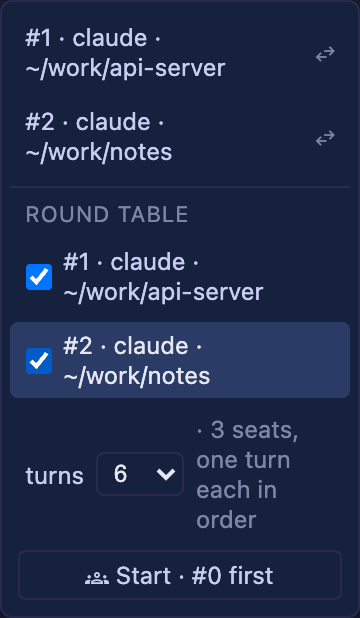
The note beside the dropdown counts you in: two ticked seats plus the cell you started from is 3 seats, one turn each in order. The button names the opener — Start · #0 first.
What it costs, before you press it
One turn is one real agent turn on a real account. The budget is therefore a spending limit as much as a runaway guard: a table of 3 with a budget of 20 is twenty full agent turns, and nothing asks you again once it is running. The default is 6, and 4 / 10 / 20 are the other choices.
Start small. A ring of three with 6 turns is enough to see whether the conversation goes anywhere.
How it ends
| It stops when | |
|---|---|
| The agents agree | a reply contains the line ROUND-TABLE-DONE on its own. Every seat is told about the marker in the text it receives, so the agents can end it themselves |
| The budget runs out | the number you picked |
| A seat does not answer in time | the same timeout the one-off exchange already used |
| You press stop | the Start button becomes running — stop while a table is going |
| The cell is closed | closing the starting cell stops the ring |
The marker is matched as a whole line, so an agent that merely discusses ROUND-TABLE-DONE does not end the conversation by mentioning it.
What it does not do yet
- The runner is in your browser. Close the tab and the ring stops. It is not a server-side job.
- Five seats maximum, counting the cell you started from.
- Only cells with agents. There is no room to join, no MCP tool, no way for an agent to start a table or to discover another cell — a human ticks the seats, and that picker is the whole admission control.
- Nothing is minuted. The conversation lives in each agent’s own transcript, as normal.
Reference: features in the living guide.
The resume list belongs to the agent you picked
Nothing to configure. Until now the launch form’s OR RESUME HERE rows were always read from Claude’s transcript directory — whatever the Agent Picker said. Pick Codex and the list still offered Claude’s conversations, and clicking one connected the codex endpoint to a Claude transcript. Meanwhile a codex, Antigravity or Grok conversation you had started in a plain terminal was reachable from no screen at all.
Now the list follows the picker:
| Agent Picker | the list under it |
|---|---|
| Claude | ~/.claude/projects — the heading stays or resume here |
| Codex | your codex rollouts — the heading reads or resume a codex conversation here |
| Antigravity | agy’s own conversations, headed agy |
| Grok | ~/.grok/sessions for this directory, headed grok |
| Shell | no list — a shell has no conversation to resume |
Switching the picker replaces the list. Resuming a row carries the agent with it, so the cell connects the endpoint that actually wrote the conversation. A custom agent runs Claude Code, so it gets Claude’s list.
Reference: basics in the living guide.
A session nobody is attached to now says so — and can be stopped there
Nothing to configure. A row in that same list can now read ● running:

What it means. The conversation’s session is still alive — the agent process is running — but no terminal is holding it. That is what a server restart leaves behind: the browser lost the session, the agent did not exit, and until now nothing on any screen could see it. They accumulate. On one machine with 21 surviving sessions, five were live agents idle for 10–11 hours with nobody attached.
What you can do.
- Click the row to resume it, as before — you get back the session that was already running.
-
Click the stop button beside it to end it. It asks first:
Stop the session running “Add a health check endpoint”? Its conversation is kept — you can resume it later — but anything it is doing right now is lost.
The conversation survives: the transcript stays on disk and the row can be resumed afterwards. What is lost is the turn that was in flight.
Only unattached rows get the button. A row marked ● open belongs to a terminal that is holding it right now — possibly a tab you cannot see from here — so it is not offered.
This is the manual half. The list is per directory and per agent, so it does not reach a project you have stopped opening. Automatic cleanup is still open as #1467.
Reference: basics in the living guide.
Every agent’s cell shows its model and context
Nothing to configure. The two badges on a cell header’s first line — the model with its context percentage, and ⇡ ⇣ for what the conversation has spent — used to appear on Claude cells only. They now answer for whichever agent the cell is running, and each one reports only what its own logs actually record:
| Cell | Model + context | Tokens |
|---|---|---|
| Claude | Opus · ctx 35% | ⇡427k ⇣1.8k |
| Codex | gpt-5.5 · ctx 33% — the window comes from codex’s own log, not a table in this app | yes |
| Grok | Grok · ctx 33% — grok’s real window (500,000 for grok-4.5) | yes |
| Antigravity | Gemini 3.6 Flash · ctx 78% — the model agy recorded for that conversation | yes |
Two things worth knowing:
- A missing reading is not a zero. If the tokens cannot be read, the cell shows the model name alone rather than
ctx 0%. If the model cannot be read either, the badge hides. Nothing is guessed — a wrong percentage is worse than no percentage, and this is the number you use to decide whether to compact. - Grok and Antigravity refresh once a minute, not at the end of each turn. Neither reports turn boundaries to us, so a cell polls instead; without it, the first reading a cell took would be the only one it ever showed. Claude and Codex update at turn end as before.
Reference: basics in the living guide.
How to tell you have it
npx mulmoterminal@latest --version
4.6.0. Then open a cell’s forum menu with a second cell running: if there is no ROUND TABLE section under the list of terminals, you are on an older build — npx caches, so @latest is what forces the fetch.