4.12.0 — The launch panel, and getting your grid back
A snapshot as of 4.12.0 (released 2026-08-28). It will go stale as the app moves on — that is expected, and the living reference is the guide each section links to.
npx mulmoterminal@latest
One thing here needs something from you and is worth reading first: if 4.11.0 came up with an empty grid, this release brings it back, and there is one case where you have to fetch something yourself. The launch panel changes a habit rather than asking for setup. The rest applies on its own.
If 4.11.0 emptied your grid
Nothing to configure. Upgrade and your layout is back.
What was broken
4.11.0 opened the browser at http://127.0.0.1:<port> instead of http://localhost:<port>. That looks like the same thing and is not: your browser files saved page data — the grid layout, the theme, the font size — under the hostname, so a different hostname is a different drawer. The app came up empty, with every session still running in tmux and nothing on screen to say the layout was one hostname away.
It was never deleted. It was filed under the other name.
How to tell you have the fix
Look at the line the launcher prints when it is ready:
────────────────────────────────────────────────
  ✓ MulmoTerminal is ready
  → http://localhost:34567
────────────────────────────────────────────────
localhost, not 127.0.0.1. Open it and your grid is as you left it.
The one case that needs a step from you
If you used 4.11.0 for a while and rebuilt your grid there, that newer arrangement is filed under http://127.0.0.1:<port> and stays there. Open that address directly to get it back, and rearrange from whichever one you prefer.
There is no way for the app to fetch it for you, and that is a browser rule rather than a missing feature: a page cannot read another hostname’s saved data, not even through a hidden frame.
If you set MULMOTERMINAL_HOST
The banner now prints the bound address on its own line as well, so the machine you opened the port for still gets told where to look:
  → http://localhost:34567
[mulmoterminal] Bound to 192.168.11.12 — reachable from another machine at http://192.168.11.12:34567
Use localhost on the machine running it, and the second address from anywhere else.
If something else already holds the port on IPv6
Rarely, another program on your machine can be listening on the same port on the IPv6 loopback. localhost can resolve there, so in that case the launcher steps aside and says so:
[mulmoterminal] Something else is already listening on [::1]:34567, so the browser is being sent to
http://127.0.0.1:34567 — the address that was checked. If your layout and settings look empty, they
are filed under http://localhost:34567.
That message is the explanation for an empty-looking grid. Stop the other program and restart, and you are back on localhost.
More on ports and hosts: the 4.11.0 page, which covers PORT and MULMOTERMINAL_HOST in full.
The launch form is now a panel
Pressing + used to append an empty square at the end of the grid — so the terminal you were about to start appeared as far from your attention as it could, and in the enlarged views it had nowhere to appear at all.
It now opens as a panel at the right edge, the same way in all three view modes.
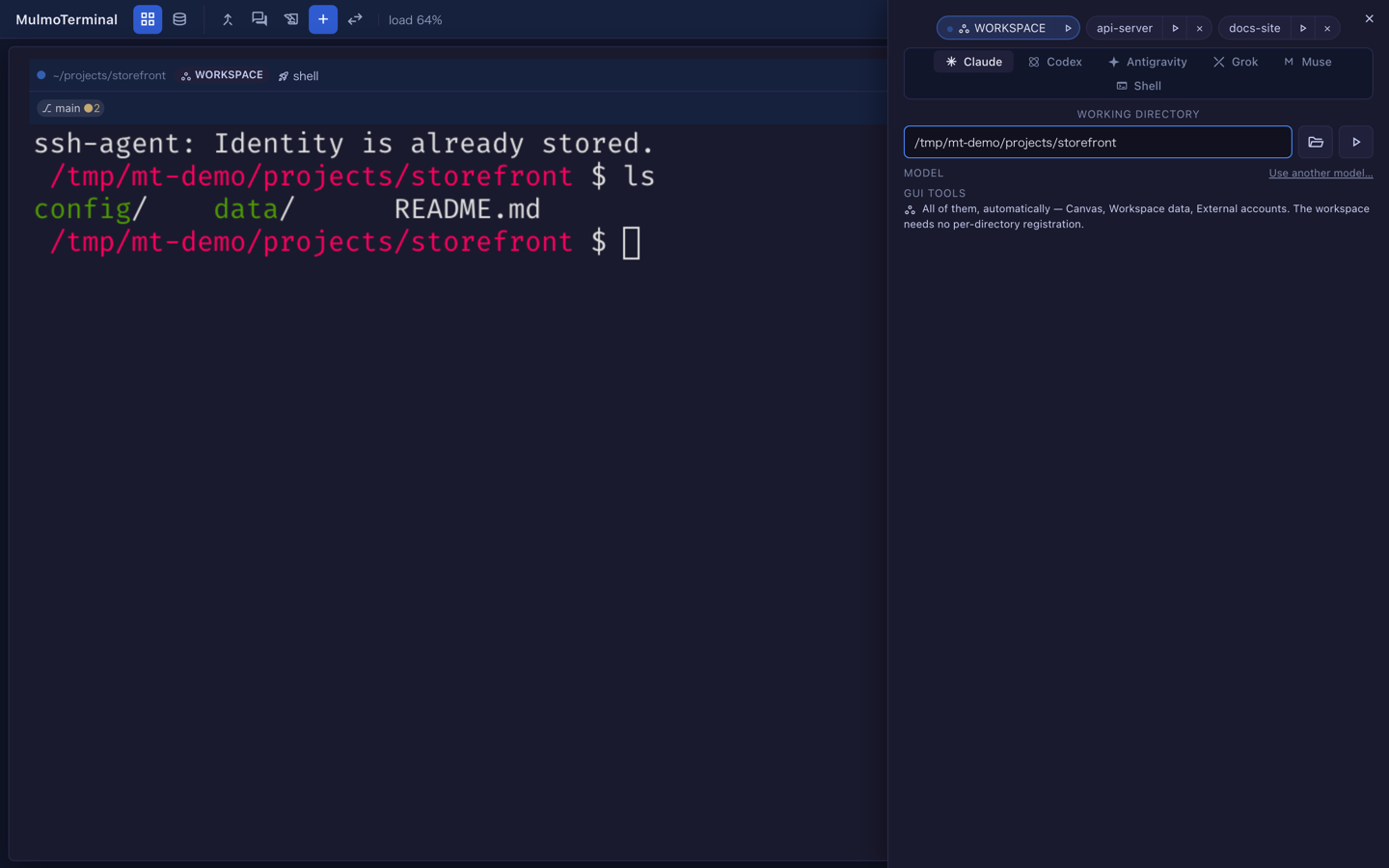
Two ways in, and they differ in which directory they hand you:
| you press | it opens on |
|---|---|
+ in the toolbar | the workspace directory |
+ on a terminal’s header | that terminal’s directory |
The second is the point: starting a second agent where you already are, without retyping a path.
While the panel is open it holds the keyboard — Escape closes it, and what you type goes to the form rather than to the terminal behind it. Closing returns focus to whatever opened it.
If you have a keymap
Three actions, and only one of them changed meaning:
| action | now |
|---|---|
terminal-new | opens the panel (was: appended a cell) |
terminal-new-here | new — the header +, panel on this terminal’s directory |
terminal-new-adjacent | unchanged — a shell in this directory, immediately, no form |
If your keymap binds terminal-new, it keeps working and now opens the panel. Nothing to edit unless you want terminal-new-here on a key. How to bind one: Keyboard shortcuts.
Two fixes that need nothing from you
A storyboard beat you asked an agent to replace was silently not replaced. Asking to swap one beat of an existing MulmoScript returned success and left the file alone, so an agent would tell you the edit was done when nothing had been written. Creating a new file always worked; only editing one in place was affected. Fixed — and an open canvas now refreshes when the file changes underneath it.
OpenRouter prices in the model picker were wrong. Sixteen of the twenty-seven OpenRouter presets disagreed with the published catalog, some by more than double in either direction, and one model claimed twice its real context window. All of them match the catalog as of 2026-08-28, and the frontier list is ordered cheapest-first again. If you choose models by the price shown, it is worth a second look — some got much cheaper. See Run Claude Code against another model.